Escape room scheduling, room by room
Plan sessions around your rooms, player limits and opening hours. Keep the staff calendar connected to the availability guests see when they reserve online.
Plan the room, then open the session.
Start with the time your game begins, its duration and the time your team needs between groups. Check the published times against your venue's operating routine before opening online reservations.
For the complete guest journey and payment options, see our escape room booking software overview.
A schedule worth testing
For a hypothetical 60-minute game starting at 2:00 pm with 15 minutes for reset, the next group starts at 3:15 pm. The reset is staff preparation time; it is separate from asking guests to arrive early.
- Check minimum and maximum players for each room.
- Review session availability across both online and staff bookings.
- Block closures and maintenance before publishing the calendar.
- Move a test reservation and verify the old and new sessions.
The timings above are an example, not a default or a promise that every venue uses the same reset policy. For more tests, use the availability checklist.
Live calendar
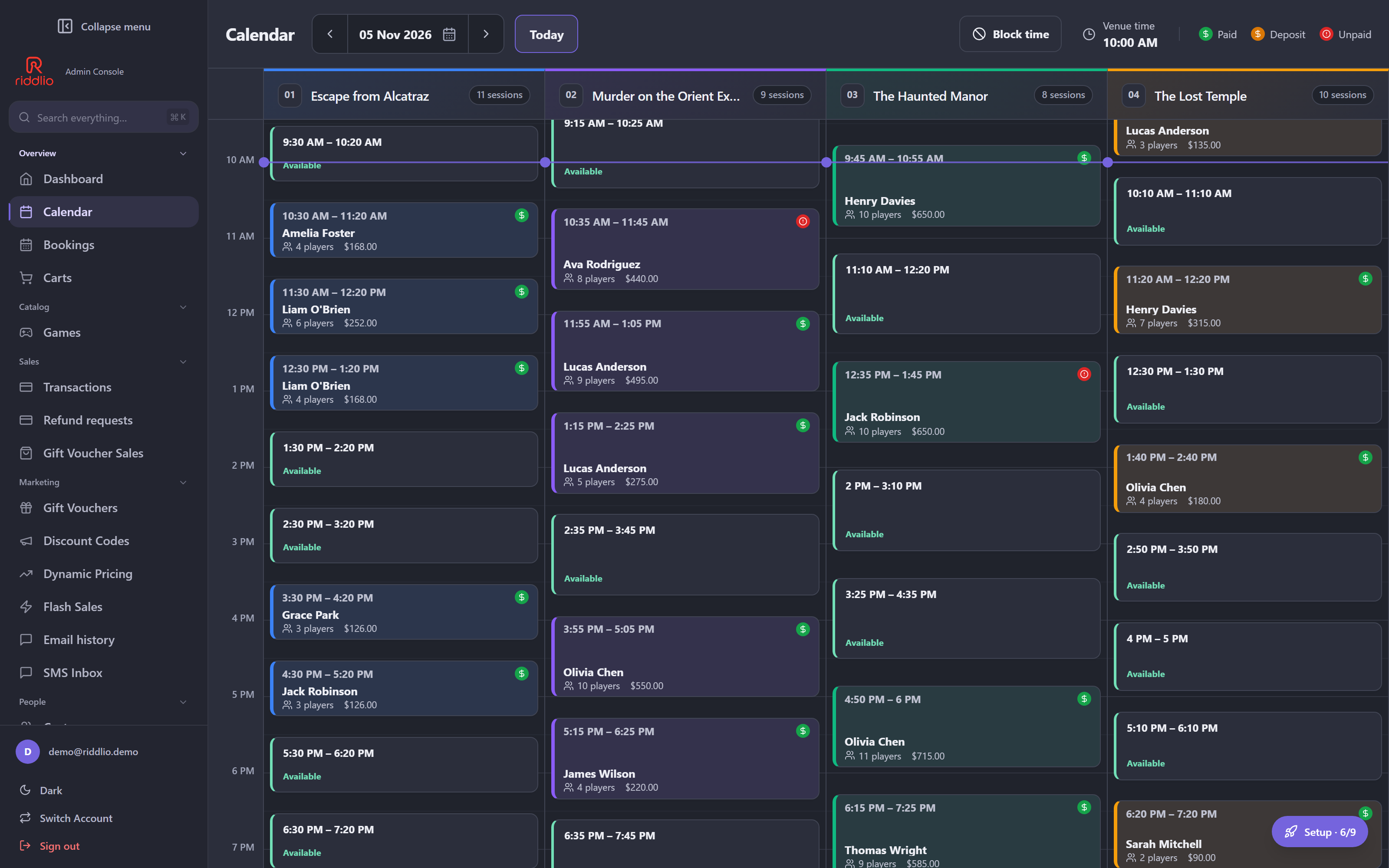
Availability and booked sessions stay visible by room.
The calendar view separates rooms and games into clear columns, shows paid, deposit, and unpaid indicators, and helps staff understand the day without opening every booking one by one.
Reservation features
Everything you need to take reservations online
Real-time availability
Customers see live time slot availability when they open the booking widget. When someone books, the slot updates for everyone else as the booking is processed. No double-booking, no phone calls needed.
White-label booking widgets
Embed a fully customizable booking widget on your existing website. Match your brand colors, choose light or dark mode, and select grid or list layout. Customers book without leaving your site.
Slot management
Configure time slots per game with custom capacities, blackout dates, and availability windows. Support for fixed schedules or dynamic slot generation based on your operating hours.
Online deposits & payments
Accept deposits, full prepayment, or pay-on-arrival. Secure provider payment processing with gateway references, balance tracking, and dashboard refund records.
Automated SMS reminders
Reduce no-shows with automatic SMS reminders sent before the booking. Configure timing, message content, and which bookings trigger reminders. Email confirmations sent automatically.
Group & private bookings
Handle both shared bookings (multiple groups in one slot) and private bookings (exclusive room access). Automatic pricing adjustments for private sessions and group discounts.
Waitlist for sold-out slots
When a slot is full, customers can join a waitlist with their name, email, and party size. Staff can notify waitlisted customers when spots open up — no lost revenue from fully booked sessions.
Booking modifications
Customers can reschedule or cancel within your configurable policy window. Staff can modify any booking from the admin dashboard with a full audit trail of changes.
FAQ
Common questions about escape room reservation systems
What is an escape room reservation system?+
Can customers book online without calling?+
How does real-time availability work?+
Can I accept deposits instead of full payment?+
Does the reservation system send reminders?+
Can I embed the booking widget on my own website?+
Start taking reservations online today
14-day free trial. No charge during trial. No per-booking fees.