
Accept the voucher code, validate it as single-use, record it under a dedicated voucher payment type, collect any top-up from the customer, then reconcile and invoice the reseller at the end of each billing period. That six-step sequence is the whole game. Everything below is the configuration, the staff workflow, and the accounting discipline that makes it work without errors.
The six steps at a glance:
- Accept the voucher code at online booking or staff checkout
- Validate single-use status, expiry, and batch rules immediately
- Record the transaction under a dedicated “Reseller voucher” or “Promissory note” payment method (not cash)
- Collect a top-up payment from the customer if the voucher value falls short
- Reconcile redeemed codes against the reseller’s invoice each billing period
- Issue an invoice to the reseller listing voucher references and amounts owed
Key takeaways
A dedicated voucher payment type is the single most important configuration decision for accurate reseller voucher redemption and clean month-end reporting.
| Point | Details |
|---|---|
| Dedicated payment type | Use a “Reseller voucher” or “Promissory note” method to keep non-cash redemptions out of cash receipts. |
| Validate at confirmation | Lock codes to single-use and enforce expiry and batch rules at the moment a booking is confirmed. |
| Allow partial payments | Configure top-up prompts so customers can complete bookings when voucher value falls short. |
| Reconcile each billing period | Export redemptions with voucher code, deal name, booking ID, and redeemed amount, then invoice the reseller. |
| Riddlio for escape rooms | Riddlio’s voucher campaigns, payment types, and Xero/MYOB integrations implement this workflow in one platform. |
Table of Contents
- How does the reseller voucher redemption flow work end to end?
- How do you configure your booking system to accept reseller vouchers?
- What validation rules and anti-fraud checks should you enforce?
- How do you reconcile redeemed vouchers and invoice the reseller?
- What do staff and customers need to do at booking and on arrival?
- Common problems and how to resolve them
- A rollout checklist you can run this week
- Why isolating reseller redemptions is the right call
- Riddlio handles voucher redemption and reconciliation for you
- Sources
How does the reseller voucher redemption flow work end to end?
The lifecycle has six stages, and knowing where each one sits prevents the most common errors.
- Reseller sells and issues a unique code. The reseller (a deal site, gift-card aggregator, or group-booking platform) collects payment from the buyer and issues a unique voucher code. Your venue has not received any cash yet.
- Customer redeems the code to create a booking. The customer enters the code online or presents it at the front desk. As Australian escape room operators show, vouchers can be accepted as full or part payment directly through the booking widget.
- Booking system assigns a voucher payment type. The order is marked with the voucher code and recorded under a non-cash payment method. Per TripWorks voucher guidance, codes move through Available → Pending → Redeemed states and should be uploaded as campaigns rather than treated as promo discounts. Because the reseller already collected payment, the voucher typically functions as a 100% comp on your side.
- Customer pays any remaining balance. If the voucher doesn’t cover the full booking cost, the customer pays the difference by card or another accepted method.
- Venue reconciles redeemed codes. At the end of the billing period, you match redeemed codes against the reseller’s invoice and create accounts-receivable entries.
- Invoice sent; funds collected per reseller terms. You invoice the reseller for the net amount owed and collect per your contract terms.
How do you configure your booking system to accept reseller vouchers?
Configuration comes down to three things: a dedicated payment method, the right fields on your booking forms, and a properly structured voucher batch upload.
Payment method setup:
- Create a payment method labelled “Reseller voucher” or “Promissory note” that posts to a holding account, not your cash receipts ledger. Arts Management Systems documents this practice as the standard approach for isolating non-cash reseller redemptions and building an audit trail for later invoicing.
- Map this payment type to a liability or holding account in Xero or MYOB so it never inflates your direct revenue figures.
Booking form fields to add:
- Voucher code (required, validated on entry)
- Reseller name (dropdown or text)
- Voucher batch or deal ID (auto-populated from the campaign where possible)
Batch upload and campaign rules:
Upload your reseller codes as a voucher campaign rather than individual entries. Including a Deal Name in the batch upload means that name appears in every booking reference, which makes later searches and invoice generation far simpler. Set each campaign with: single-use enforcement, a validity window, allowed activities, any blackout dates, minimum guest counts, and whether online redemption is permitted.
Pro Tip: Configure partial payment behaviour so the booking widget accepts the voucher as a first payment and automatically prompts the customer for a top-up if a balance remains. This prevents abandoned bookings where the voucher doesn’t fully cover the cost.
Enable tracking fields (Reseller reference, Voucher ID) to appear on booking confirmations and in backend exports. Those fields are what make reconciliation fast at month end.
What validation rules and anti-fraud checks should you enforce?
Gift voucher fraud is a real operational risk, and the controls are straightforward to implement.
- Single-use lock: Mark codes as redeemed the moment a booking is confirmed. A short reservation hold window during checkout reduces race conditions where two customers attempt the same code simultaneously.
- Expiry and blackout enforcement: Block redemptions outside the campaign’s valid date range and on any blackout dates you’ve configured.
- Batch mapping: Each code must map to its correct campaign and activity. A code from a Groupon voucher redemption campaign should not be redeemable against a premium private booking it was never priced for.
- Duplicate prevention: Use server-side checks at confirmation, not just at code entry, to catch edge cases.
- Photo or QR capture: Where the reseller requires physical validation, staff can scan or photograph the voucher at redemption and store a redaction-safe evidence file linked to the booking. The reseller must also be whitelisted in your system and the location must support the reseller’s settlement method.
Pro Tip: Flag suspicious patterns in your redemption report: a high volume of same-reseller codes redeemed from a single account in a short window, or codes being attempted outside the reseller’s geographic market, both warrant a manual review before confirming the booking.
How do you reconcile redeemed vouchers and invoice the reseller?
This is where most venues lose money, not through fraud but through sloppy month-end processes.
| Export column | Purpose |
|---|---|
| Voucher code | Unique identifier for matching against reseller records |
| Voucher batch / deal name | Groups codes by campaign for invoice line items |
| Booking ID | Links redemption to the specific booking record |
| Booking date | Scopes the export to the billing period |
| Activity / product | Confirms the code was used for an authorised experience |
| Redeemed amount | The face value applied at checkout |
| Reseller name | Identifies which reseller to invoice |
| Invoice status | Flags whether the redemption has already been billed |
Step-by-step reconciliation:
- Export the redemption report filtered to the billing period using the columns above.
- Confirm the voucher payment type total does not appear in your cleared cash receipts. The Promissory Note or Voucher payment method should sit in a holding account until you convert it to an AR invoice.
- Match redeemed codes to the reseller’s invoice file. Raise any discrepancies before issuing your invoice.
- Produce an invoice listing each voucher reference, the deal name, the redeemed amount, and any commission or fee deduction where the reseller remits a net figure.
- Post the invoice to accounts receivable and mark each redemption as “invoiced” in your booking system to prevent duplicate billing.
- Reconcile the booking system export with Xero, MYOB, or your ERP to confirm revenue accuracy.
Pro Tip: Never edit customer revenue lines to fix an accounting mismatch. Re-export the redemption report, reconcile the voucher payment type totals, and post a correcting journal entry instead.
What do staff and customers need to do at booking and on arrival?
Online redemption (customer-facing):
- Show a “Redeem voucher” link on the booking widget
- Prompt for the voucher code and contact details
- Display any remaining balance and prompt for top-up payment
- Send a confirmation email that includes the voucher reference, reseller name, and arrival instructions
Staff checkout flow:
- Select the reseller from a dropdown, then scan or manually enter the code
- Capture a photo or QR image if the reseller requires physical evidence
- Apply the “Reseller voucher” payment type and collect any top-up by card
- Mark the booking as checked in on arrival, with voucher evidence attached to the record
Pro Tip: Reconcile your voucher payment type total against collected vouchers at the end of each trading day, not just at month end. Catching a missed redemption the same day is a five-minute fix; finding it six weeks later during invoicing is not.
Keep all voucher evidence and redemption notes for the full invoicing period. Your reseller contract will specify how long records must be retained.
Common problems and how to resolve them
Expired or invalid codes: Verify the campaign rules and check whether the code was issued before the campaign’s start date. Where the error is on the reseller’s side, offer a rebooking flow rather than a manual override.
Double redemption: Search booking history by voucher code. Mark the duplicate booking as refunded or voided. If both bookings were actually used, invoice the reseller for the duplicate redemption and document the evidence.
Refunds and chargebacks: Your reseller contract determines who holds financial liability. Log all refund actions against the voucher payment type, not against cash, so the audit trail stays clean.
- Determine liability per contract before processing any refund
- Log the refund action against the voucher payment type
- Adjust the AR invoice or raise a credit note for the affected period
Lost codes or customer error: Require proof of purchase from the reseller before any manual intervention. Do not allow manual code reuse under any circumstances.
Accounting mismatches: Re-export the redemption report, reconcile voucher payment type totals, and post a correcting journal entry. Never adjust customer revenue lines directly.
A rollout checklist you can run this week
- Create a test voucher batch and upload 5–10 single-use codes with a clear deal name
- Run an online redemption test for a full-comp scenario and a partial-value scenario
- Run a staff checkout test for both scenarios and confirm the voucher payment type is recorded
- Verify the booking confirmation email contains the voucher reference and reseller name
- Simulate end-of-period reconciliation: export redemptions, produce a sample invoice, and post it as an AR entry
- Train front-of-house staff on the arrival validation checklist and evidence capture procedure
- Confirm single-use lock fires correctly on the second attempt with the same code
- Confirm partial payment prompts the customer for a top-up before confirming the booking
- Confirm the voucher payment type does not appear in cash receipts in your accounting integration
Pro Tip: Upload your test batch using the same CSV format you’ll use in production. Use a CSV format with one code per row and no header row; plan your test upload and validate all codes before importing a full production batch.
Why isolating reseller redemptions is the right call
The conventional wisdom in venue management is to keep things simple and run everything through one payment method. That instinct is wrong the moment you add a reseller to the mix.
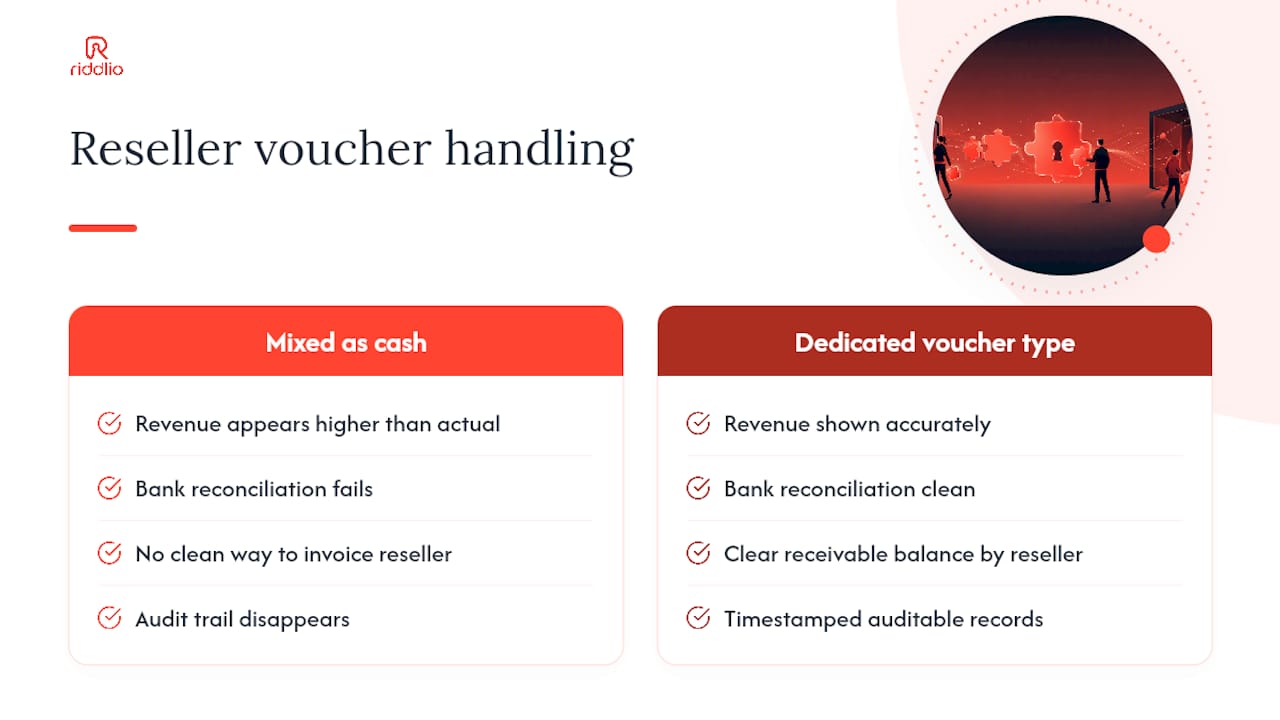
When a reseller voucher redemption posts as a cash receipt, your revenue looks higher than it is, your bank reconciliation fails, and you have no clean way to produce an invoice showing what the reseller owes you. The audit trail disappears. Month-end becomes a manual archaeology project.
A dedicated voucher payment type solves all three problems at once. It isolates non-cash transactions, creates a clear receivable balance by reseller, and gives you a report you can hand to your accountant without explanation. Riddlio’s gift voucher and payment features are built around exactly this separation: voucher campaigns, dedicated payment types, and export reports that include the fields needed for reseller invoicing.
The operational benefit compounds over time. Venues that separate direct and reseller revenue from day one can see at a glance which channels are performing, negotiate better reseller terms from a position of data, and resolve disputes quickly because every redemption has a timestamped, auditable record.
Riddlio handles voucher redemption and reconciliation for you
Configuring this workflow from scratch takes time. Riddlio brings voucher campaign uploads, dedicated voucher payment types, partial-payment prompts, and reseller reconciliation exports into one system built for escape room venues.

The online booking widget includes a built-in redeem-voucher link. The staff checkout supports manual code entry and photo capture. Redemption exports include every field needed for reseller invoicing, and the platform integrates directly with Xero and MYOB so your accounts receivable stays accurate without manual data entry. Payment processing handles top-ups alongside voucher redemptions in a single checkout flow.
Start a free trial or book a demo at Riddlio to see the voucher upload and reconciliation workflow running in a live venue environment.
Sources
- Secondary Ticket Outlet Voucher Redemption | Arts Management Systems
- Uploading Bulk Grabone/Third Party Deal Codes - RTBS CRS - Confluence
- Vouchers | Escape This