Start from the payout or settlement file, not the booking calendar. Normalise every line into a canonical schema, match it against your PMS ledger and bank deposit, and log whatever doesn’t tie out as an exception. Get that sequence right and payout reconciliation bookings become a repeatable, auditable process instead of a monthly scramble, whether you’re chasing figures through Stripe, Adyen, Booking.com, or a system like Riddlio.
TL;DR:
- Most mismatches in payout reconciliation stem from timing gaps, netted fees, refunds, chargebacks, or failed payouts, requiring specific investigation approaches.
- Automating import and matching rules, and locking each batch as it balances, significantly reduces manual effort and speeds up month-end closing processes.
- Using a canonical schema with key fields like payout ID, booking ID, gross, fee, and net amounts helps avoid errors and clarifies discrepancies.
- Reconciliation often completes within minutes for structured batches, but unautomated processes can extend delays to days, increasing risk of errors.
- Centralizing booking data and payment metadata via integrated platforms like Riddlio simplifies matching and audit trails, replacing multiple exports and manual reconciliation steps.
Table of Contents
- What is payout reconciliation and why does it matter for bookings?
- [How do you reconcile a poker tournament payouts batch step by step?](#how-do-you-reconcile-a-poker-tournament-payoutshttpsshuffleupcoukarticlespoker-tournament-payouts-batch-step-by-step)
- What causes payout discrepancies and how do you investigate them?
- Which tools and controls cut down manual reconciliation work?
- What running this daily actually looks like
- How Riddlio keeps booking and payout data in one place
- Where to go for the exact report formats
- Sources
- FAQ
What is payout reconciliation and why does it matter for bookings?
Payout reconciliation is the process of matching three separate records for every deposit: the booking ledger in your property or venue management system, the settlement report from your payment processor or OTA, and the actual deposit that lands in your bank account. When those three streams disagree, and they often do, someone has to work out why.
Skip this discipline and the damage compounds quietly. Owners get paid the wrong amount. Tax filings understate or overstate revenue depending on which side of the gap you’re on. Cash flow forecasts drift because you’re planning against bookings, not against what actually clears the bank.
Most finance teams underestimate the time cost until they’ve missed it once. A single missed reconciliation can take days to unwind, tracing which bookings fed which payout batch weeks after the transaction detail has gone cold.
Ownership usually splits two ways:
- Operations pulls the booking and PMS exports because they own the calendar and guest records.
- Finance owns the processor settlement files, the bank statement matching, and the exception log.
How do you reconcile a poker tournament payouts batch step by step?
Treat each payout, not each booking, as the unit of reconciliation. Trying to build a payout backwards from individual reservations is where most manual processes fall apart, because the settlement file already contains the netting logic your ledger doesn’t show.
- Export the payout file first. Pull the CSV or report from your processor or OTA for the batch you’re closing, and treat it as the settlement source of truth for that deposit. Adyen’s documentation makes the same point differently for on-demand payouts versus scheduled settlements, since the right method depends on payout type.
- Export the booking ledger for the same window and normalise every field into your canonical schema before you attempt any matching.
- Run matching rules against payout ID, booking ID, and amount. Automated rules should clear the bulk of straightforward matches in one pass, leaving only genuine exceptions for manual review.
- Handle partial matches and split deposits. Some payouts bundle several bookings, refunds, and adjustments into a single net figure. Where a deposit needs splitting across bookings, post an adjustment journal entry rather than forcing a false match.
- Log every exception with a reason code, retain the source exports, and lock the period once it balances. Building the reconciliation into month-end close, rather than treating it as a side task, is what keeps owner statements accurate.
Pro Tip: Lock reconciled bookings as you go instead of waiting until the whole batch balances. PMS documentation on reconciliation status tracking shows statuses like “full in bank,” “partial in bank,” and “no match found” are useful precisely because they let you close the easy 80% early and focus remaining time on genuine exceptions.
What causes payout discrepancies and how do you investigate them?
Most mismatches trace back to one of four patterns, and each needs a different investigation approach.
- Timing gaps. A booking captured on one date can settle days later and hit the bank on a third date entirely. Before assuming an error, check whether the discrepancy disappears once you widen the reconciliation window by a day or two.
- Netted fees. Processor fees, commission, and adjustments often get bundled into a single net line. Map each fee component back to the specific booking it belongs to using the itemised report rather than the summary.
- Refunds and chargebacks. These frequently appear on the processor side before they show up in the booking ledger. Trace the transaction ID across both systems rather than trying to match by amount alone, since a partial refund changes the figure you’re hunting for.
- Failed or partial payouts. When a payout fails or arrives short, hold the difference in a clearing or escrow account with an interim status rather than forcing it into either bucket prematurely.
If a genuine discrepancy survives investigation, post an adjustment rather than leaving the period open indefinitely. Reopening a closed period should be rare enough that when it happens, it prompts a review of why the original match failed.
Which tools and controls cut down manual reconciliation work?
The payout CSV scales because it already contains the netting logic your team would otherwise have to rebuild by hand, refund by refund, fee by fee. Trying to reconstruct a deposit from individual reservations instead of starting from the settlement file is the single most common way teams burn hours they didn’t need to spend.
- Set up scheduled imports so the payout file, booking ledger, and bank export land in the same canonical format automatically, with no manual reformatting between systems.
- Build matching rules once, on payout ID and booking ID, and let them run on every batch rather than re-deriving logic each cycle.
- Keep audit logs and retention settings switched on so every matched deposit has supporting evidence attached if an owner or auditor asks for it later. Riddlio’s approach to audit log retention for bookings follows the same logic: keep the trail, not just the total.
- Decide early whether you need a payout-focused workflow or whether a lightweight bank-rule approach covers your volume. A venue processing a handful of payouts a week doesn’t need the same tooling as a multi-location operator running daily settlements.
Pro Tip: Batch by channel and payout window rather than trying to reconcile everything in one sitting. Grouping by processor or OTA before you start matching keeps you in one mental model instead of context-switching between three different report formats mid-session, a pattern Stripe’s own reporting guidance reflects in how it structures report types by category.
What running this daily actually looks like
Small teams that stay on top of payout reconciliation bookings batch by channel, not by calendar day, and rarely touch every payout at once. A tighter window, cleared daily or every few days, keeps the exception queue short enough that nothing goes cold before someone remembers what caused it. Locking each batch as it clears is what makes month-end close and owner statements fast rather than frantic.
— Iosif Beraru
How Riddlio keeps booking and payout data in one place
Riddlio is the alternative to piecing reconciliation together across three disconnected systems: it centralises booking events, payment metadata, and audit logs so the match-up work starts half-done. Instead of exporting a PMS ledger from one tool and a settlement file from another, venue operators using Riddlio see payment status attached to each booking as it happens, with audit logs that hold up when an owner or accountant asks for evidence.

The platform’s payment processing integrations connect directly to processors like Stripe, Square, and PayPal, surfacing the same fee and net breakdowns you’d otherwise chase through a separate reconciliation report. For venues running multiple rooms and time slots, that means fewer manual exports and a clearer trail from booking to bank deposit. If you’re reconciling payouts by hand right now, it’s worth seeing what an export-driven reconciliation flow looks like inside a single system. Plans start at $29 a month on the Starter tier, with Pro and Unlimited adding deeper reporting; check current pricing to see which tier fits your booking volume.
Where to go for the exact report formats
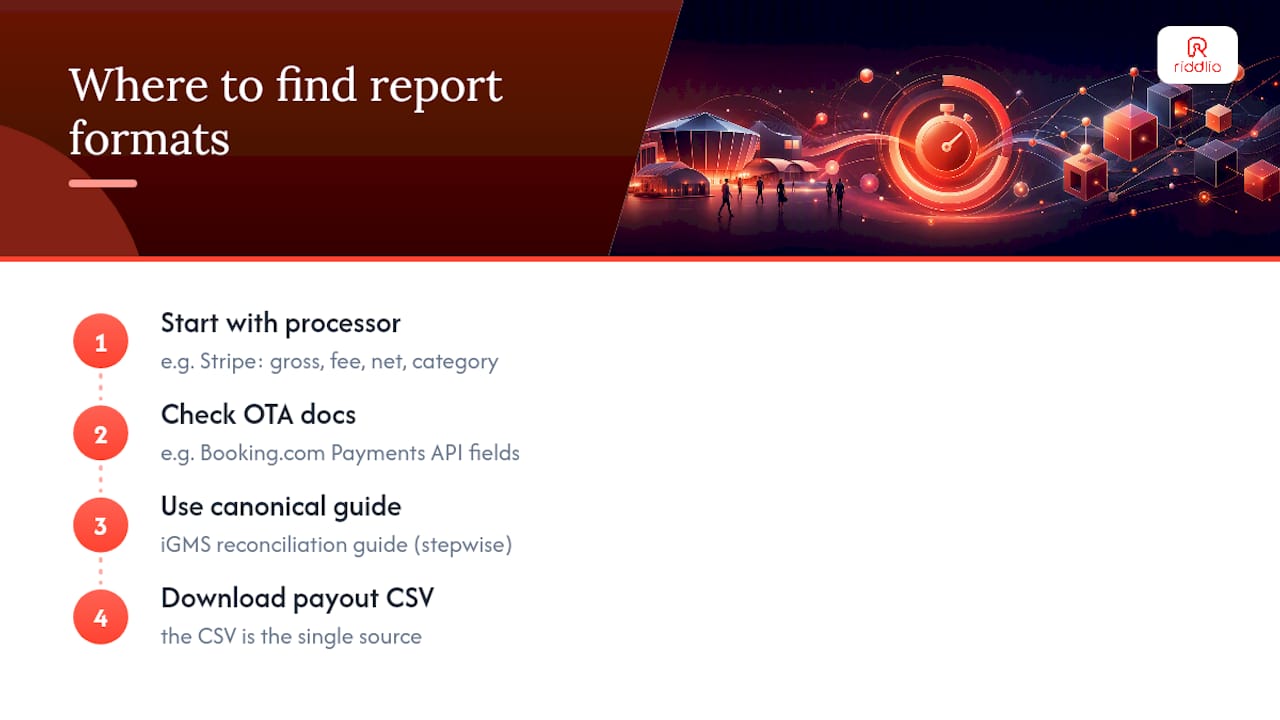
Start with your processor’s own documentation before building anything custom. Stripe’s payout reconciliation reports specify the exact columns in each downloadable CSV, including gross, fee, net, and reporting category. If you’re reconciling OTA-sourced bookings, Booking.com’s Payments API documentation covers the reservation-level payout fields available for matching. For a channel-agnostic walkthrough of the canonical schema approach, the vacation rental reconciliation guide from iGMS lays out a stepwise method that transfers cleanly to timed-venue bookings. Whichever source you pull from, download the payout CSV first. Everything else in the process exists to explain that file.
FAQ
What is the purpose of the payout reconciliation report in Stripe?
Stripe’s payout reconciliation reports, both itemised and summary, break down exactly which transactions, fees, and adjustments make up a given payout amount, so you can match the net figure back to individual bookings without guessing.
Does reconciliation mean refund?
No. Reconciliation is the process of matching booking, payout, and bank records to confirm they agree. A refund is one possible cause of a discrepancy you might find during that process, not the process itself.
How do you handle uncleared amounts in a reconciliation?
Hold the unmatched amount in a clearing or interim status rather than forcing it into either the matched or exception bucket, then investigate before the period closes. If it remains unresolved, log it with a reason code and post an adjustment rather than leaving the batch open indefinitely.
How long does a payout reconciliation typically take?
For a well-structured batch with a canonical schema and automated matching rules already in place, most reconciliations clear the majority of transactions in minutes, leaving only genuine exceptions for manual review. Teams without automation, or without a defined workflow like the one platforms such as Riddlio support, can lose days chasing the same gaps repeatedly.