For active escape room bookings, use a two-way API-based Outlook calendar sync; an ICS subscription is a read-only visual overlay that can lag 12–24 hours behind reality. For a venue running multiple sessions a day, that gap is long enough to cause double-bookings.
What to do right now:
- If you use Riddlio: enable the two-way Outlook integration from your Riddlio dashboard, authenticate via Microsoft OAuth, and test with a sandbox booking before going live.
- If you cannot yet enable API access: publish an ICS link from your booking calendar and add it to Outlook as a subscribed calendar. Label it clearly as read-only for all staff.
- If you are on Microsoft 365: check whether your staff are on the same tenant. Same-tenant sharing syncs instantly; cross-tenant or external sharing falls back to periodic refresh, which occurs every few hours.
The rest of this guide explains why, with setup steps, troubleshooting, and a maintenance schedule.
Table of Contents
- How do the three Outlook calendar sync methods actually differ?
- Which method suits your escape room venue?
- How to connect Riddlio’s two-way Outlook sync (and set up the ICS fallback)
- What to do when Outlook calendar sync stops working
- What does setup actually cost and how long does it take?
- Key takeaways
- Why Riddlio builds two-way calendar sync specifically for escape rooms
- Riddlio’s Outlook integration: fewer double-bookings, simpler staff workflows
- Useful sources
How do the three Outlook calendar sync methods actually differ?
There are three ways to connect a booking system to Outlook, and they are not interchangeable.
ICS subscription generates a URL that Outlook polls on a schedule. It is read-only: edits made in Outlook never travel back to the source. ICS subscriptions typically refresh on a schedule that can be several hours apart, though Outlook.com users see updates more frequently. For a venue taking last-minute bookings or cancellations, that lag is operationally dangerous.

Manual ICS export/import is a one-time snapshot: you export a .ics file, import it into Outlook, and it never updates again. Useful for a one-off staff handover or a historical record, not for live operations.
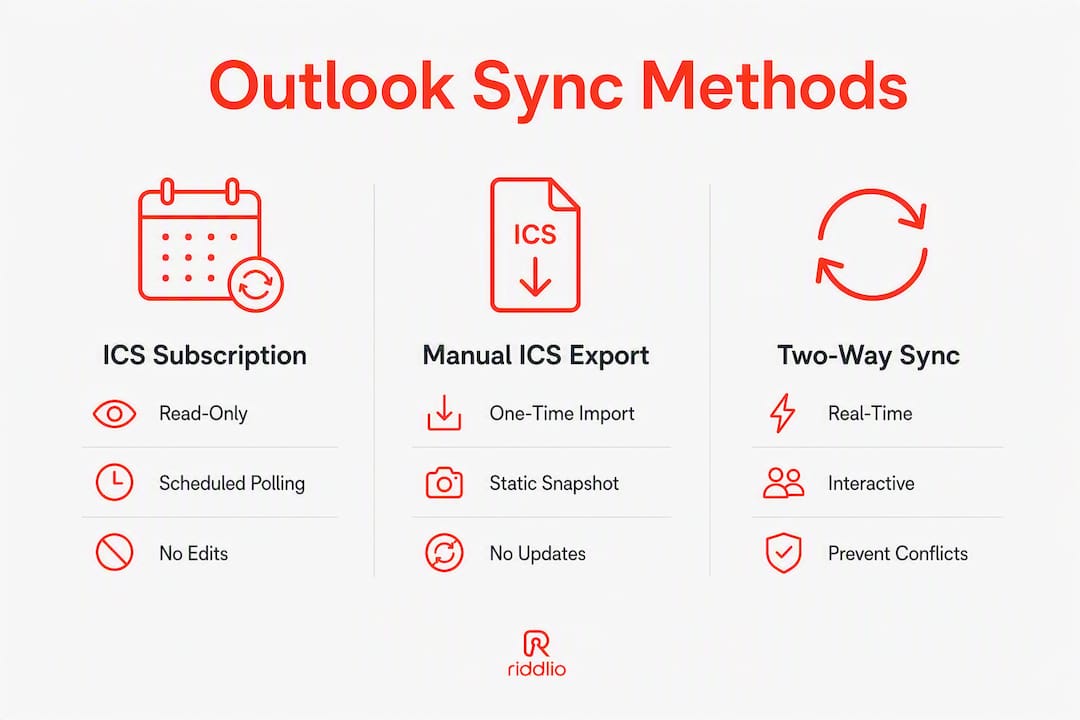
API-based two-way sync connects your booking platform directly to Microsoft 365 via OAuth and the Microsoft Graph API. Changes flow in both directions in near real time. API-based tools use webhooks and polling to achieve sub-minute propagation, compared to the multi-hour lag of ICS.
| Dimension | ICS subscription | Manual ICS export | API two-way sync |
|---|---|---|---|
| Direction of sync | One-way (read-only) | One-way (snapshot) | Bidirectional |
| Latency / refresh | 12–24 hours | Never (static) | Seconds to ~60 seconds |
| Setup complexity | Low (URL + subscribe) | Minimal (export/import) | Medium (OAuth, admin consent, room mapping) |
| Double-booking risk | High for active venues | Very high | Low when configured correctly |
| Cost / requirements | Free, no admin needed | Free, no admin needed | Requires Microsoft 365 subscription tier with API access; Riddlio integration enabled |
Key distinction: Instant syncing within Microsoft 365 applies only when both parties are on the same tenant. Share a calendar to an external address or a different tenant and you drop to periodic refresh, regardless of which Outlook client you use.
Which method suits your escape room venue?
The decision rule is straightforward: if any staff member needs to edit a booking and have that change appear immediately on every device, you need API two-way sync. If you only need a shared view and all edits stay inside one system, an ICS subscription can work as a temporary measure.
Venue-specific examples:
- Single-room venue, one operator: An ICS subscription is low-risk if you manage all bookings in one place and treat Outlook as a display-only calendar.
- Multi-room venue with front-desk and floor staff: Two-way API sync is necessary. A cancellation taken at the front desk must vanish from the floor manager’s Outlook immediately.
- Multi-location venue: API sync with room/resource mapping is the only viable approach. ICS cannot distinguish between rooms at different sites.
- Phone-heavy bookings with frequent last-minute changes: ICS is unsafe here. A booking taken by phone at 6:00 PM may not appear in Outlook until the following morning.
When an ICS is acceptable:
- Marketing or operations staff who only need a visual overlay of upcoming sessions.
- A temporary fallback while API credentials are being provisioned.
- Sharing a public-facing “next available” view with a partner who does not need to edit anything.
When an ICS is unsafe:
- Any staff member who edits, cancels, or creates bookings directly in Outlook.
- High-volume venues with multiple sessions per hour.
- Venues where mobile staff rely on Outlook for real-time availability checks.
How to connect Riddlio’s two-way Outlook sync (and set up the ICS fallback)
Preparation
Before you start, confirm you have Exchange admin or Microsoft 365 Global Admin credentials. You will need to grant API consent for the Riddlio application. Back up your current Outlook calendar by exporting a .ics snapshot before making any changes.
Riddlio two-way API setup
- Log in to your Riddlio dashboard and navigate to Integrations > Calendar.
- Select Microsoft Outlook / Microsoft 365 and click Connect.
- Authenticate via the Microsoft OAuth prompt. Sign in with your admin account and grant the requested calendar scopes (read/write access to calendars and resources).
- Map each escape room to its corresponding Outlook room or resource calendar. Use consistent naming across both systems to avoid duplicate entries.
- Create a test booking in Riddlio and confirm it appears in Outlook within 60 seconds.
- Edit the test booking (change the time) and confirm the update propagates to Outlook.
- Cancel the test booking and confirm it is removed from Outlook.
Pro Tip: Create a dedicated service account in Microsoft 365 for the Riddlio integration rather than connecting under a personal admin account. If that person leaves, the integration breaks. A service account keeps the connection independent of individual staff.
ICS fallback (Outlook desktop and web)
- In Riddlio, go to Settings > Calendar > ICS Feed and copy the published ICS URL.
- In Outlook on the web: go to Add calendar > Subscribe from web, paste the URL, and name it something like “Riddlio Bookings (read-only).”
- In Outlook desktop (classic): go to File > Account Settings > Internet Calendars > New, paste the URL, and tick “Update this subscription with the publisher’s recommendation.”
- Brief all staff that this calendar is read-only and may lag by several hours. Never let staff cancel or edit bookings directly in this calendar view.
What to do when Outlook calendar sync stops working
Most Outlook calendar sync issues trace back to a short list of causes: expired authentication, an outdated Outlook client, a corrupted local cache (OST file), or misconfigured sync settings.
Quick diagnostic checklist:
- Open Outlook on the web (OWA) first. OWA is the truth source for your mailbox. If the booking appears there but not in the desktop client, the issue is local to that machine.
- Force a manual sync: in Outlook desktop, go to Send/Receive > Update Folder.
- Check that the calendar is actually selected and visible in the left-hand panel. A deselected calendar looks like a sync failure.
- Sign out of Outlook and sign back in to refresh the authentication token.
For stubborn desktop failures: Rebuilding the Outlook profile or recreating the OST file resolves cases that simple cache clearing cannot fix. Go to Control Panel > Mail > Show Profiles, create a new profile, and reconnect your account.
For mobile devices not syncing: A corrupted ActiveSync relationship is the most common culprit. Remove the Exchange account from the device, remove the ActiveSync relationship from the mailbox in the Microsoft 365 admin centre, then re-add the account on the device and restart.
For calendar items missing only on mobile: Temporarily disable any booking-related Outlook add-ins. Some add-ins produce calendar item formats that ActiveSync cannot process.
Note: IMAP and POP accounts cannot sync calendars at all. If a staff member’s Outlook is connected via IMAP, bookings will never propagate. The account must use Exchange ActiveSync or a modern API connection.
Maintenance schedule:
- Daily (morning shift): Confirm the first two bookings of the day appear correctly in Outlook. Takes 90 seconds.
- Weekly: Cross-check Riddlio’s booking list against Outlook for the coming seven days. Flag any discrepancies immediately.
- Monthly: Verify the API connection is still authenticated in Riddlio’s integration settings. OAuth tokens can expire or be revoked.
Before contacting support: Collect a screenshot of the booking in Riddlio, a screenshot of the Outlook calendar at the same time slot, the Outlook sync log (found under Send/Receive > Show Progress), and the device/OS version. This cuts resolution time significantly.
What does setup actually cost and how long does it take?
| Method | Setup time | Typical cost | Admin requirements |
|---|---|---|---|
| ICS subscription | Under 5 minutes | Free | No admin access needed |
| Manual ICS export | — | Free | No admin access needed |
| API two-way (Riddlio) | 2–8 hours (including testing) | Included in Riddlio subscription tier; internal IT time if admin provisioning is needed | Microsoft 365 Global Admin or Exchange Admin |
Cost factors to plan for:
- Internal IT time to provision the service account and grant API consent (typically 1–2 hours for a straightforward Microsoft 365 setup).
- If your venue has multiple rooms mapped as separate Outlook resources, allow extra time for naming alignment and testing each room individually.
- Australian venues operating across time zones (e.g. a Sydney and Perth location) should confirm that room calendars are set to the correct local time zone in Microsoft 365 before mapping.
- Ongoing: budget roughly 30 minutes per month for token verification and a quarterly check of room/resource naming consistency.
Vendor and admin checklist before you start:
- Confirm your Microsoft 365 subscription includes Exchange Online (not just email-only plans).
- Identify the Global Admin or Exchange Admin who will grant OAuth consent.
- Create and name room/resource calendars in Microsoft 365 before connecting Riddlio.
- Run the integration on a test booking before switching live traffic.
Key takeaways
API-based two-way Outlook calendar sync is the only method that prevents double-bookings for escape room venues running active, multi-session schedules.
| Point | Details |
|---|---|
| API sync is the only safe choice | ICS subscriptions are read-only and often lag between 12 and 24 hours behind the source calendar; only API sync propagates edits in near real time. |
| Same-tenant sharing syncs instantly | Microsoft 365 instant sync applies only within the same tenant; cross-tenant or external sharing refreshes periodically, usually every few hours. |
| ICS is a fallback, not a solution | Use an ICS subscription only as a temporary visual overlay while API credentials are being provisioned. |
| Verify sync daily | A silent sync failure looks like normal operation until a double-booking occurs; a 90-second morning check prevents this. |
| Riddlio handles the integration | Riddlio’s two-way Outlook integration covers setup, room mapping, and real-time propagation for Australian escape room venues. |
Why Riddlio builds two-way calendar sync specifically for escape rooms
The most common operational pain point we hear from Australian venue operators is not that their booking system is wrong. It is that their Outlook is wrong, and nobody noticed until a group arrived for a session that had been cancelled two hours earlier.
A read-only ICS feed creates a false sense of security. Staff see a calendar that looks current, act on it, and discover the lag only when something goes wrong. Two-way API sync removes that gap entirely: a cancellation in Riddlio disappears from every connected Outlook calendar within seconds, on every device.
For multi-room venues, the room-mapping feature in Riddlio’s escape room management software means each physical room has its own Outlook resource calendar. Front-desk staff, floor managers, and mobile staff all see the same live state. When a group books via the online booking widget, that session appears in the correct room calendar immediately, with no manual entry required.
Australian operators can reach Riddlio support directly for assisted setup, including help with Microsoft 365 admin consent and room mapping configuration.
Riddlio’s Outlook integration: fewer double-bookings, simpler staff workflows
Double-bookings cost Australian escape room venues real money and real reputation. Riddlio’s two-way Outlook sync solves the problem at the source: every booking, edit, and cancellation made in Riddlio propagates to connected Outlook calendars in near real time, across every room and every device your staff use.

Setup takes as little as two hours for a single-location venue. Riddlio’s online bookings feature includes the Outlook integration, along with automated SMS reminders, payment processing, and operational analytics. Larger venues with multiple rooms or locations can request an assisted onboarding session where Riddlio’s team walks through room mapping and Microsoft 365 admin consent step by step.
Head to riddlio.com to start a trial or contact support to enable the Outlook integration for your venue today.
Useful sources
Reference links for operators and IT staff who want to verify procedures or go deeper on specific issues.
For IT and Exchange admins:
- Calendar sharing in Microsoft 365 — Microsoft Support. Covers tenant vs external sharing behaviour, instant sync eligibility, and ICS URL generation. Start here for any Microsoft 365 sharing question.
- Troubleshoot sync issues with OST files — Microsoft Learn. The authoritative guide to rebuilding corrupted Outlook profiles and OST files.
- Calendar on mobile device not synced to online mailbox — Microsoft Learn. Step-by-step guide to diagnosing and fixing ActiveSync relationship failures on mobile devices.
- Calendar on mobile device not synced (Exchange) — Microsoft Learn. Covers add-in interference with ActiveSync and the recommended diagnostic sequence.
For operators:
- My Outlook calendar won’t sync — Microsoft Q&A. Practical operator-level fixes for calendar visibility and cache issues.
- Outlook calendar not syncing — troubleshooting guide — Virto Software. A practical walkthrough of the most common sync failure causes and ordered fixes.
- API vs iCal for active booking systems — Smoobu. Industry analysis on why API connections outperform ICS for venues with live booking traffic.
- Calendar sync methods and latency — Calendo. Industry analysis covering ICS refresh windows and API polling frequencies.