Set four age bands: 6–8 for family rooms, 9–12 for youth puzzles, 13–15 for teen rooms, and 16+ for mature or horror experiences, as outlined in the CodeBusters Escape Room age limits guide. The core rule is simple: an adult stays in the room with any group where the youngest player is under 13, to 15 depending on room intensity, and every minor needs a signed waiver before the clock starts.
TL;DR:
- Age restrictions should be based on the cognitive and physical development of each band; minors under 13 need adult supervision in the room.
- Rooms with sensory effects like fog, confined spaces, or loud noises should have a minimum age of 13 or higher, with clear warnings displayed during booking.
- Booking systems must require the youngest participant’s age, trigger automatic waiver links, and enforce deposit and ID checks for children under 12.
- Consistent staff enforcement and precise policy signage are crucial to avoid liability and ensure safety during gameplay.
- Automated workflows integrating age fields, waivers, and deposits improve compliance and reduce front-desk disputes.
Table of Contents
- What age bands work best for escape rooms?
- Supervision, parental consent and waivers: what to enforce
- How should you classify rooms by age suitability?
- How do you enforce your policy at the point of booking?
- What should your policy checklist and signage actually say?
- What operators get wrong about age policies
- Turn your age policy into an automated booking workflow
- Sources
What age bands work best for escape rooms?
Age bands only work if they match what a young brain can actually do under pressure. A six-year-old can spot a colour pattern but cannot hold four clues in their head while a timer runs. That is why family rooms built for the 6–8 bracket lean on visual and physical puzzles rather than multi-step logic chains.
The four bands below give most venues a workable starting point, based on how operators in the field already segment their rooms:
- Family (6–8): Bright sets, short puzzle chains, no jump scares, adult always in the room.
- Youth (9–12): Slightly longer logic sequences, some independent problem solving, adult usually in the room unless the venue runs supervised group play.
- Teen (13–15): Multi-step puzzles, mild tension elements, adult onsite rather than in-room for most groups.
- Mature/horror (16+): Startles, low light, confined spaces, strict age enforcement at the door.
Attention span drives puzzle design more than most operators admit. A nine-year-old’s working memory can juggle roughly three to four items at once, so a room stacked with seven-step chains will frustrate that age group regardless of how clever the puzzle is. Match complexity to the band, not the other way around.
Physical demands matter just as much as cognitive load. Rooms with heavy props, tight crawl spaces, or delicate antique-style set pieces should carry a higher minimum age than their puzzle difficulty alone suggests, because a distracted eight-year-old near a fragile prop is a liability problem before it’s a fun problem. Guidance for teens and parents generally puts horror-themed rooms at 13 and up, with under-tens steered toward non-horror content entirely.

Supervision, parental consent and waivers: what to enforce
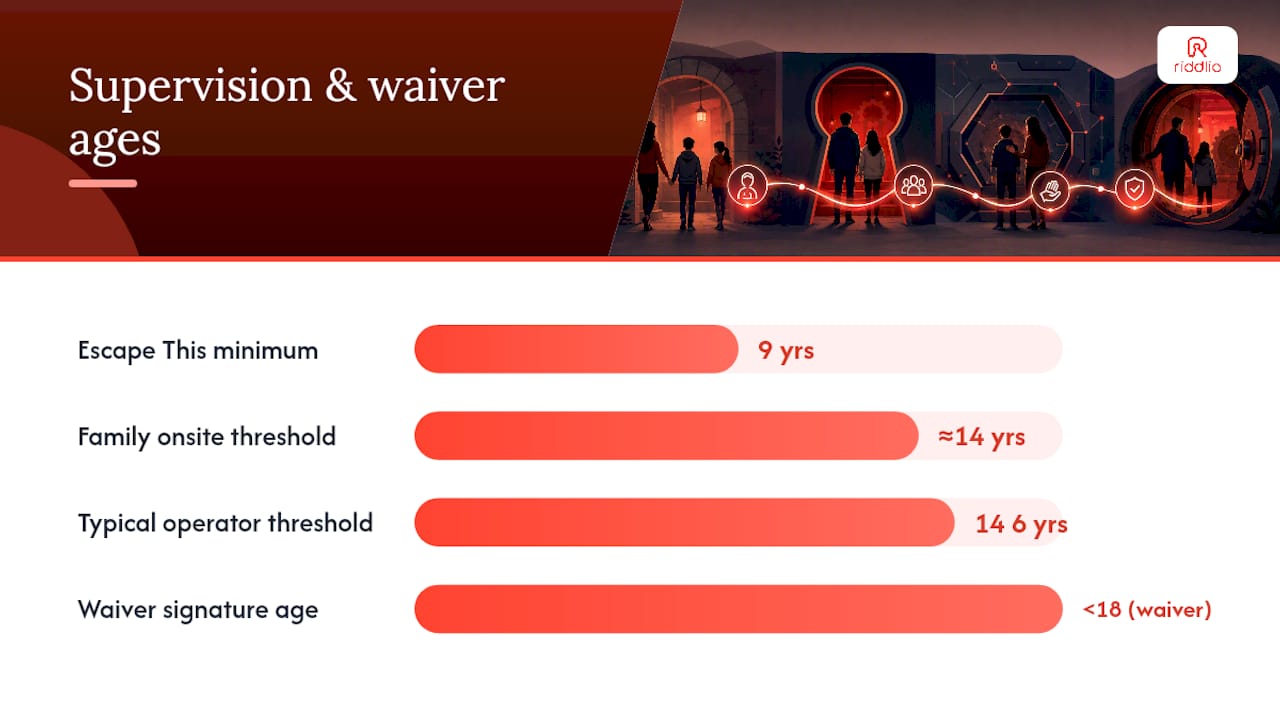
Get the supervision line wrong and you either annoy families with unnecessary rules or expose the venue to a real incident. Most operators land on a threshold somewhere between 14 and 16: below that age, an adult needs to be physically in the room, not just in the building.
Example escape room policy examples worth borrowing:
- Require an adult in the room for any group where the youngest paying participant is under 15, following the approach used by Key to Escape.
- Allow a lower onsite-only threshold, around 14, if the group is a genuine family booking rather than a mixed group of unrelated minors, similar to the model Escape This publishes with its 9-year recommended minimum.
- Require a parent or legal guardian signature on every waiver for players under 18, collected electronically before arrival, as Breakout Games recommends to avoid delays at check-in.
- Verify the guardian’s identity against the booking name when the waiver is signed onsite rather than in advance.
- Refuse entry, or hold the group at reception, if a minor arrives without a signed waiver and no guardian is present to sign one.
Pro Tip: Send the waiver link in the same message as the booking confirmation, not a separate reminder days later. Guests fill out forms while they’re still excited about the booking, not when a generic reminder lands in a crowded inbox.
Venues must consistently enforce waiver requirements for minors before play starts to avoid setting problematic precedents.
How should you classify rooms by age suitability?
Three categories cover almost every escape room lineup: family-friendly, mixed/teen, and mature/horror. The classification should be printed on the booking page, not buried in a terms-of-service link nobody opens.
Criteria for each tier are mostly about sensory intensity rather than puzzle difficulty:
- Family-friendly: No startles, full lighting or near-full lighting, no smoke effects, props sized for small hands.
- Mixed/teen: Some jump moments, moderate darkness, occasional loud sound cues, standard-size props.
- Mature/horror: Fog machines, actors or live scares, confined or crawl-space sections, strobe lighting.
Any of these features should push the minimum age up regardless of which band the room otherwise sits in: real fog or haze, confined crawl spaces, sudden loud noises, or props heavy enough to injure someone if mishandled. Add a one-line content warning and an age flag directly on the booking widget for every room in the mature category, so the restriction is visible before a card gets charged, not after a family shows up confused at the door.
How do you enforce your policy at the point of booking?
Policy on paper does nothing if the booking flow lets a group of unaccompanied ten-year-olds reserve a horror room at 9pm. The enforcement has to live in the workflow itself.
- Make the “youngest player’s age” a required field at checkout, not an optional note.
- Trigger the waiver link automatically the moment a minor’s age is entered, with a hard block on the booking until it’s signed.
- Send an automated reminder 24 hours before arrival asking guests to bring photo ID for the adult attending.
- Charge a modest damage deposit on bookings with children under 12, refunded after a post-game room check.
- Give staff a written script for two situations: refusing entry over a missing waiver, and stopping a game mid-session if a child’s behaviour becomes unsafe for themselves or the props.
One operator example is worth copying directly: ESCAPE! Alaska charges an added deposit for bookings that include children under 12 and refunds the bulk of it after inspection, minus processing and service fees. That single policy line does two jobs at once. It covers realistic prop damage risk, and it signals to parents that the venue takes both safety and their booking seriously.
Every incident, no matter how minor, needs a two-line written record: what happened, who was involved, and what staff did about it. Skip that step and you have no defence if a complaint escalates weeks later. It’s also worth treating everyone who walks into a room as a counted head for capacity purposes, paying or not, since fire-code and safety limits don’t distinguish between a ticket holder and a sibling who tagged along.
What should your policy checklist and signage actually say?
A policy that lives only in a staff handbook gets forgotten by the third week of a new hire’s shift. Put it somewhere staff and guests both see it constantly.
Run through this checklist before your next booking cycle:
- Age band and minimum listed for every individual room, not a blanket venue-wide number.
- Supervision rule stated plainly: in-room adult required under what age, onsite-only above it.
- Waiver link attached to the booking confirmation, with a hard stop if unsigned by arrival.
- Deposit policy noted for bookings with children under 12.
- Signage at reception matching the online wording exactly.
- A five-minute staff briefing covering refusal scripts and incident documentation.
Sample wording for a booking page: “This room is recommended for ages 13 and up; guests under 15 must have an adult in the room for the full session.” Sample in-venue signage: “An adult must remain in the room with any player under 15. Waivers must be signed before entry.”
Private bookings, school groups and birthday parties often need a modified version of the standard rule. A birthday party of eleven-year-olds with three parents present might satisfy your supervision requirement with one adult per room instead of one per child, so long as your waiver and headcount rules stay intact.
Building that flexibility into the written policy now saves an awkward negotiation at the front desk later.
What operators get wrong about age policies
The mistake I see most often isn’t setting the wrong age. It’s setting a reasonable age policy and then failing to enforce it consistently, because enforcement was never built into the booking system. Staff end up making judgment calls on the fly, and judgment calls under time pressure are where inconsistency and liability creep in.
The second mistake is treating the waiver as a formality rather than a filter. A waiver collected before arrival catches missing consent while there’s still time to fix it. A waiver chased at the front desk catches it while a group is standing in your lobby, annoyed, holding up the next booking.
Better booking checks and automated reminders don’t just reduce awkward front-desk moments. They protect revenue, because a group turned away at 6:55pm for a 7pm slot rarely becomes a group that rebooks. Fix the policy at the point of booking, and most enforcement problems disappear before they reach your staff.
— Iosif Beraru
Turn your age policy into an automated booking workflow
A well-designed booking system can give you the practical means to enforce every rule outlined above without adding manual work for your staff. Age fields at checkout, e-signed waivers triggered automatically for minors, automated SMS reminders asking guests to bring ID, and deposit collection for groups with younger children all run through one connected system instead of scattered spreadsheets and sticky notes at reception.

The practical payoff is fewer missing waivers at the door, fewer disputes over who was supposed to bring what, and a clean digital record if an incident ever needs reviewing. Deposit refunds process through the same payment system that took the original booking, so your team isn’t chasing separate refund requests by hand. If your current booking page still relies on a guest remembering to bring a printed waiver, take a look at Riddlio’s online booking calendar and see how age fields and waiver triggers can sit directly in your booking flow from today’s first reservation onward.
Sources
- Minors — ESCAPE! Alaska
- Questions About Escape Rooms | Escape This
- Key to Escape
- Escape Room Age Requirements | Breakout Games