An incident reporting process is a defined workflow that captures factual incident data, triggers an investigation, records required logs, and drives corrective action to prevent recurrence. It exists to protect people first and the organisation second, and it only works when everyone knows what counts as reportable, who to tell, and how fast. The templates, OSHA timelines, and step-by-step workflow below give you everything needed to run one properly.
TL;DR:
- Most incidents should be reported if there’s any chance a regulator, insurer, or lawyer might question them within six months, regardless of certainty.
- The incident report must include core fields such as who, what, when, where, immediate actions, witnesses, and evidence references, with mandatory and structured inputs.
- Urgent incidents like serious injuries, fatalities, or environmental releases trigger immediate internal reporting and external notifications within eight to 24 hours to comply with regulations.
- Investigation and correction processes should start within 24 to 48 hours, with root cause analysis conducted in a systematic, evidence-based manner using techniques like the 5 Whys.
- A digital incident system should enforce field completion, attach files, log timestamps and changes, and connect to relevant operational or HR systems for comprehensive, traceable record-keeping.
Table of Contents
- What counts as a reportable incident?
- Essential fields and a template for every incident report
- Step-by-step incident reporting workflow from first report to closure
- How to investigate incidents and reach root causes
- Near-miss reporting: fields, prioritisation and culture
- Digital workflows and tooling: what to require from an incident system
- Making the incident reporting process stick in operations
- Regulatory pages and templates to download
- Sources
What counts as a reportable incident?
Most reporting systems fail at the first hurdle: nobody agrees on what actually needs to be written up. A supervisor sees a spilled chemical, shrugs, and mops it up. A worker twists an ankle, walks it off, and says nothing. Neither event gets logged, and neither gets fixed before it happens again, harder.
An effective incident reporting process defines objective facts about incidents so an organisation can identify risk patterns and stop them recurring, according to Riskonnect. That starts with a shared, specific definition of what belongs in the system. Six categories cover almost everything you’ll encounter:
- Injuries and adverse events — anything from a paper cut requiring first aid to a hospitalisation. All of it gets logged; severity determines what happens next, not whether it gets recorded at all.
- Near-misses — no injury occurred, but conditions lined up so that one easily could have. These are your cheapest early-warning system and the most under-reported category by far.
- Hazardous conditions — a frayed cord, a blocked fire exit, a missing guard rail. Nobody got hurt yet, but the exposure exists right now.
- Security incidents — unauthorised access, theft, data breaches, or physical threats against staff or customers.
- Equipment failures — a machine that stops mid-cycle, a safety interlock that doesn’t engage, a vehicle that fails inspection unexpectedly.
- Environmental incidents — spills, emissions, or waste-handling failures that could trigger external regulatory notification.
Some of these carry extra weight the moment they happen. A serious injury, a fatality, or an inpatient hospitalisation trips OSHA’s mandatory notification clock (more on the 8 and 24-hour windows shortly). A data breach might trigger state notification law regardless of what your internal policy says. A chemical spill above a threshold quantity can pull in environmental regulators who have nothing to do with workplace safety at all.
For triage, a simple rule works better than a flowchart: if there’s any chance a regulator, insurer, or lawyer will ask about this event in six months, report it now. Waiting for certainty before reporting is how organisations end up with gaps in the record exactly when they need it most.
Essential fields and a template for every incident report
A report form is only as good as the fields it forces someone to fill in. Skip a field, and you’ve built a gap into your own evidence trail. The core factual fields apply to every incident type; the investigation-ready fields kick in once something needs deeper analysis.
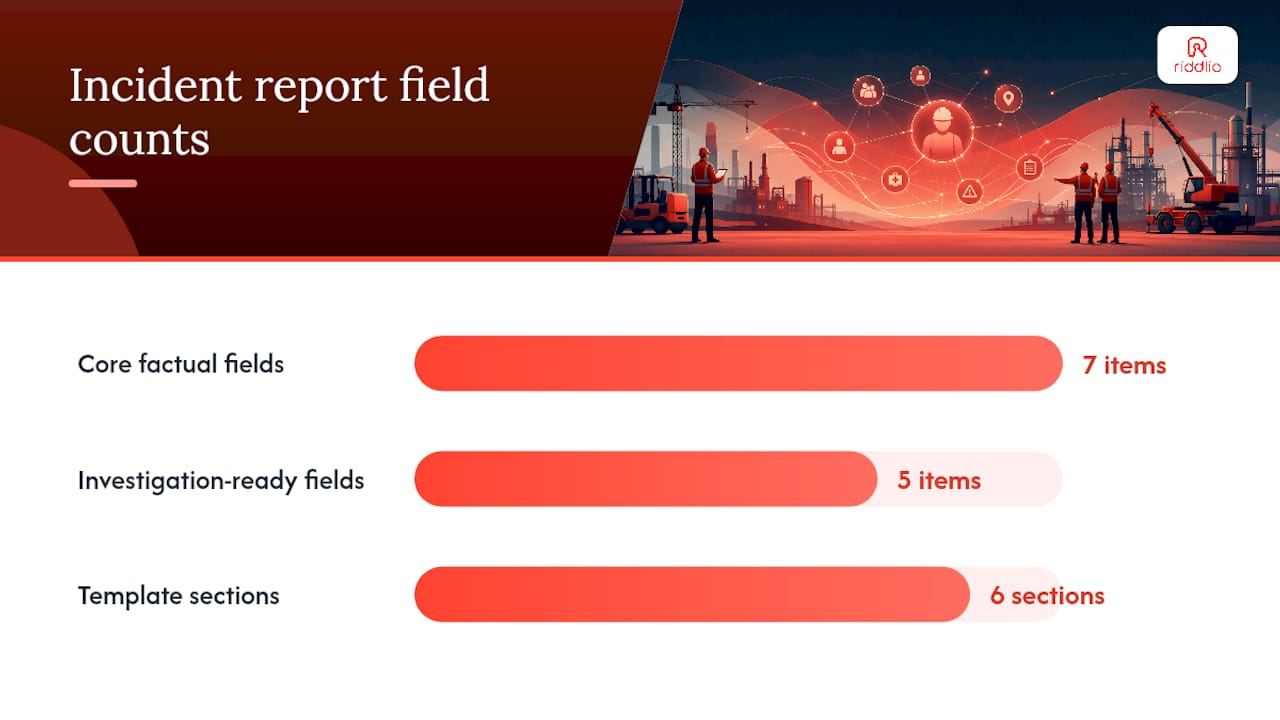
Core factual fields (mandatory, every report):
- Who — the injured or affected person’s name, role, and contact details, plus anyone else directly involved.
- What — a plain description of what happened, written as fact, not opinion (“the ladder slipped” not “someone was careless”).
- When — date and exact time, not “this morning” or “around lunch.”
- Where — specific location, down to the room, aisle, or equipment ID.
- Immediate actions taken — first aid given, area cordoned off, equipment shut down.
- Witness details — names and contact information for anyone who saw it happen or arrived immediately after.
- Evidence references — photos, CCTV timestamps, damaged equipment tags, or samples collected.
Investigation-ready fields (add for anything beyond a minor near-miss):
- Sequence timeline — a minute-by-minute reconstruction where possible, built from witness statements and system logs.
- Equipment and asset IDs — serial numbers, last maintenance date, and whether the equipment was in or out of its inspection window.
- Permits and authorisations — was a permit-to-work in place, and was it followed?
- Training records — had the people involved completed the relevant training, and when?
- Prior incident history — has this piece of equipment, this location, or this task failed before?
Pro Tip: Build your form so the mandatory fields are physically impossible to skip, digitally or on paper. A free-text box invites a vague, unusable narrative; a structured field with a dropdown or a required timestamp forces the reporter to actually look at their watch and the room around them.
A compact template structure looks like this in practice:
Section 1: Incident Identification — report number, date/time of incident, date/time of report, location, reporter name.
Section 2: People Involved — injured party details, witnesses, supervisor on duty.
Section 3: Description — what happened, immediate cause if obvious, immediate actions taken.
Section 4: Classification — incident type (injury, near-miss, hazard, security, equipment, environmental), severity rating, external notification required (yes/no).
Section 5: Evidence — photos, CCTV references, physical evidence collected and stored where.
Section 6: Investigation — assigned investigator, root cause findings, corrective actions, verification date.
Adapt the weighting, not the skeleton. A near-miss report can compress Sections 2 and 5 into a single line each since there’s usually no injured party and less physical evidence. A serious injury report expands Section 6 substantially, because that’s where the OSHA-facing investigation lives. A security incident swaps “equipment IDs” for “access logs” and “system identifiers” but keeps the same who/what/when/where spine. The OSHA recordkeeping forms package uses this same logic across the 300, 300A, and 301 forms, and equivalent employer-designed forms are acceptable as long as they capture the same required data points.
Step-by-step incident reporting workflow from first report to closure
The gap between a good template and a good process is discipline around timing and handoffs. A perfect form filled in three weeks late is worse than a rough one filed the same day. Here’s the sequence that actually holds up under pressure.
Immediate response (0 to 60 minutes):
- Secure the area and prevent further harm. Nobody investigates while someone’s still bleeding or a machine is still running.
- Provide first aid or call emergency services if needed.
- Preserve the scene. Don’t clean up, move equipment, or “tidy” before evidence is captured. Cordon it off if you have to.
- Notify the direct supervisor immediately, verbally, before any paperwork starts.
- Take photos and note witness names while memories are fresh and phones are already in hand.
Notification chain (same day):
The supervisor escalates to the safety lead or EHS manager within the shift, not at end of day. For anything involving hospitalisation, amputation, loss of an eye, or a fatality, the notification chain compresses hard: OSHA requires employers to report a fatality within 8 hours and an in-patient hospitalisation, amputation, or loss of an eye within 24 hours of learning about it. Miss that window and you’re not just late on paperwork, you’re in breach of a federal deadline with its own penalty structure.
Roles matter here, and blurring them slows everything down:
- Supervisor: first responder, scene security, initial verbal notification.
- Safety lead / EHS manager: formal intake, classification, decision on whether external notification is triggered.
- Investigator (sometimes the same person, sometimes a dedicated role for serious incidents): evidence collection, root-cause analysis, corrective action design.
- Site or department leadership: sign-off on corrective actions and resourcing to implement them.
Recordkeeping deadlines:
Once an incident is confirmed recordable under OSHA criteria, it has to go on the OSHA 300 Log and OSHA 301 Incident Report within seven calendar days of the employer receiving information that the case occurred. That seven-day clock starts on notice, not on the date the paperwork happens to get finished, so a report sitting in someone’s inbox for five days already eats most of the buffer.
Investigation, correction, and closure:
- Assign an investigator within 24 to 48 hours for anything beyond a minor near-miss. Delay here is where root causes get lost.
- Conduct the investigation using a structured method (covered in depth in the next section).
- Draft corrective actions with named owners and deadlines, not vague commitments like “improve training.”
- Implement the corrective actions and document that implementation, with dates and evidence.
- Verify effectiveness, usually 30 to 90 days later, by checking whether the same hazard or failure mode has recurred.
- Close the report formally, with sign-off from the safety lead, and file it in whatever system supports future audits.
Nothing in that closing loop is optional if you want a reporting system that improves anything. A report that gets filed and forgotten is just paperwork; a report that gets closed out with a verified fix is prevention.
How to investigate incidents and reach root causes
Most incident investigations fail for a boring reason: they stop at the first plausible explanation. “The worker wasn’t paying attention” closes the file fast and fixes nothing, because it doesn’t ask why the worker wasn’t paying attention, or why the task design made that lapse dangerous in the first place.
OSHA’s incident investigation guidance sets out a four-step systems approach that avoids this trap: preserve and document the scene, collect information, determine root causes, and implement corrective actions. The value of treating it as a system rather than a checklist is that each step deliberately builds on the last. You don’t collect information before the scene is preserved, because you’ll lose evidence. You don’t jump to corrective actions before root causes are actually established, because you’ll fix the wrong thing.
Evidence collection, done properly, follows a few non-negotiable rules:
- Interview witnesses separately, not as a group, to avoid one account contaminating another.
- Interview as soon as possible after the event, ideally within hours, while details are still sharp.
- Frame every interview as fact-finding, not fault-finding. “Walk me through what you saw” gets better answers than “why did you do that.”
- Get permission before recording interviews, and tell people how the information will be used.
- Photograph the scene from multiple angles before anything is moved or repaired.
Peer-reviewed work on critical incident reporting backs this up directly: timely, factual documentation paired with a structured, systems-focused investigation is what actually enables organisational learning, according to a review published on PMC. Blame-driven investigations produce defensive witnesses and thin evidence; systems-driven investigations produce usable data.
Once evidence is collected, the 5 Whys technique turns a factual timeline into a root cause. Ask “why” against the immediate cause, then ask “why” again against that answer, typically five times, until you hit something an organisation can actually control, like a missing procedure, an unmaintained guard, or a training gap. Modern incident tools increasingly build this into a guided 5 Whys workflow that structures the questioning instead of leaving it to whatever the investigator remembers from a training session two years ago.

Pro Tip: For incidents with more than one contributing factor, a single “why” chain will lead you down one path and blind you to the others. Run a branch analysis instead: multiple “why” chains from the same incident, each following a different contributing factor to its own root cause. It takes longer, but it produces parallel corrective actions instead of one fix that leaves two other failure modes untouched.
Corrective actions coming out of this process need to be measurable and time-bound. “Retrain staff” is not a corrective action; “complete refresher training for all forklift operators on loading dock 3 by the 15th, verified by written test” is. Record the corrective action, its owner, and its verification date directly in the incident report so closure isn’t a separate, disconnected step months later.
Near-miss reporting: fields, prioritisation and culture
A near-miss is an event where no injury or damage occurred, but a slight shift in timing or position would have produced one. OSHA’s near-miss template captures exactly that: what almost happened, what procedures (if any) were violated, and what should change to stop it happening for real next time.
Near-miss capture is one of the highest-return practices in a reporting system, because it surfaces hazards before anyone gets hurt, and templates that force a recommendation field turn that visibility into an actual prevention output rather than just a log entry. The fields worth requiring are narrower than a full incident report:
- What almost happened — the near-outcome, described specifically (“forklift passed within half a metre of a pedestrian” not “close call in the warehouse”).
- Contributing factors — what conditions made this possible: blind corner, no pedestrian barrier, operator distraction.
- Recommended fix — the reporter’s own suggestion, even if it’s rough. They were there; their instinct is data.
- Frequency signal — has this near-miss type happened before in this location?
Getting people to actually submit these is the harder problem. Most near-miss programs die from under-reporting, not bad templates. Three things fix that: keep the form genuinely short (under two minutes to complete), offer an anonymous submission option for anything involving a colleague’s behaviour, and, critically, close the loop by telling reporters what changed as a result. A near-miss system where nothing visibly happens after a report trains people to stop bothering within a few months.
Prioritise follow-up by potential severity, not by how many people reported it. A single near-miss involving a forklift and a pedestrian outranks a dozen reports about a sticky door handle, even though the door handle reports will pile up faster.
Digital workflows and tooling: what to require from an incident system
Paper forms and email chains still handle incident reporting in plenty of organisations, and they mostly work until the moment they don’t: a report goes missing, a photo never gets attached, a corrective action gets agreed verbally and nobody follows up. A digital system exists to remove those failure points, not to add complexity for its own sake.
At minimum, require these capabilities from any incident reporting system, whether you’re buying one or specifying one internally:
- Mandatory field enforcement — the system physically blocks submission until who/what/when/where and immediate actions are filled in.
- Photo and file upload — attached directly to the report, not emailed separately and hoped for.
- Automatic timestamping — every submission, edit, and status change logged with a time and a user ID, so the audit trail is self-generating.
- Assignment and escalation — investigators get notified the moment a report is classified, not when someone remembers to forward it.
- Full audit trail — every change to a report after submission is tracked, which matters enormously if a regulator or an insurer ever asks to see the file.
- Data export — clean export to spreadsheet or PDF for OSHA summary posting and any external audit request.
Free-text narrative fields without any structure around them tend to produce reports investigators can’t actually use later; forcing an evidence path with mandatory timestamps, mandatory photos, and structured checklists is what keeps report quality consistent regardless of who’s filling it in on a busy shift. Guided root-cause templates work the same way. A digital 5 Whys workflow that prompts each successive “why” and requires an answer before moving on produces measurably better root-cause records than a blank text box captioned “root cause,” because most people under time pressure will write one line and move on if given the chance.
If you’re specifying a vendor or building a case for a system upgrade, the checklist worth working through includes integration points beyond the incident form itself: does it connect to HR for employee records, to your broader EHS or safety management system for trend analysis, to payroll for workers’ compensation claims, and to case management for anything that ends up in litigation or insurance review?
For venue-based businesses specifically, the incident record rarely lives in isolation from operational data. An escape room, for example, needs the incident report to connect back to who was booked into that slot, what waiver they signed, and what staff member was on shift, because all three become relevant the moment a customer injury report gets filed. Riddlio’s escape room management software keeps booking, staffing, and digital waiver records in one operational view specifically so that when an incident happens, the supporting evidence, who was present, what they’d agreed to, when the session ran, is already sitting there rather than scattered across three separate systems.
Making the incident reporting process stick in operations
Most incident reporting systems don’t fail because the template is wrong. They fail because the organisation running them quietly punishes the behaviour it claims to want. Report an injury, and the reporter gets a safety talking-to about “being more careful.” Report a near-miss, and it disappears into a spreadsheet nobody looks at again. Do that twice, and people stop reporting. Not out of malice, out of rational self-interest.
The trade-off everyone gets wrong is speed versus thoroughness. Rushing an investigation to close it fast produces the “worker error” verdict that fixes nothing. But an investigation that drags on for six weeks loses the interview quality that comes from fresh memory, and it signals to the workforce that reporting leads to bureaucratic limbo rather than action. The fix isn’t picking one over the other. It’s separating the two clocks: document and preserve evidence within hours, but let root-cause analysis run on its own timeline, days if it needs to, as long as the reporter sees visible movement in the meantime.
Leadership behaviour is the actual lever here, more than any form design choice. When a fix gets implemented, tell the people affected specifically what changed and why, ideally referencing the report that triggered it. That single habit does more for reporting culture than any poster campaign. Recognition works too, but only if it’s for reporting, not for having a clean record. An organisation that rewards zero incidents on a scoreboard is training its workforce to hide incidents, which is the exact opposite of what a reporting system exists to achieve.
The pitfall I see most often in practice is treating the reporting form as the whole system. It’s the intake point, nothing more. Organisations that invest heavily in a slick digital form but never build the follow-through, assigned owners, verification dates, visible closure, end up with a very well-documented archive of unfixed problems. The form matters less than the discipline behind it.
— Iosif Beraru
Regulatory pages and templates to download
A handful of official documents cover almost everything you need to build or audit a compliant process. The OSHA recordkeeping forms package (regulatory requirement) provides Forms 300, 300A, and 301. OSHA’s incident investigation guide (template/example) walks through the four-step systems approach with sample forms. The OSHA near-miss report template (template/example) gives a ready-to-use starting point, and the Medicaid incident management booklet (template/example) offers a useful cross-industry model for notification timelines and roles.