Send confirmed bookings server-side to Meta’s Conversions API alongside the browser pixel, not instead of it. Match every server event to its browser counterpart with a shared event_id, hash user identifiers before they leave your server, and verify each event in Test Events before trusting it in Ads Manager. Skip any of the three and you’ll either double-count conversions or miss them entirely.
TL;DR:
- Sending both browser pixel and server events with matching event_id is essential to accurately track bookings and avoid double-counting or missed conversions.
- Use native integrations or partner tools for faster setup, but custom server integration offers full control at a higher maintenance cost and complexity.
- Properly hashing and including user identifiers such as email, phone, and click IDs significantly improves event match quality and deduplication reliability.
- Accurate event naming, especially case-sensitive matching like Schedule versus schedule, is crucial to prevent underreporting or duplication.
- Ongoing verification with Test Events and routine reconciliation against actual payment data are necessary to maintain data integrity over time.
Table of Contents
- What is Facebook Conversions API for bookings and why does server signalling matter?
- What are the practical integration options for booking flows?
- What fields does a booking event need to match and optimise well?
- How does deduplication work for booking events (the event_id strategy)?
- How do you test and troubleshoot a booking implementation?
- What’s the operational checklist for launching booking events?
- Why dual-signal tracking is the only defensible long-term approach
- How Riddlio feeds clean booking data straight into your CAPI setup
- Where to go for the official specs and worked examples
- Sources
- FAQ
What is Facebook Conversions API for bookings and why does server signalling matter?
The Meta Conversions API lets a booking platform send confirmed appointments, reservations, and purchases straight from its server to Meta and bypass the browser entirely. Server events get processed identically to pixel events once they land at Meta, feeding the same measurement and optimisation systems that decide who sees your ads next.
That matters because the browser pixel alone misses a growing share of bookings. Safari’s tracking prevention, ad blockers, and iOS opt-outs all interfere with client-side pixels before they ever fire. A customer books through an embedded widget inside an iframe, closes the tab before the pixel loads, or runs an ad blocker that strips the script entirely, and the booking simply vanishes from your ad account’s view. The Conversions API works around all of that because it never depends on the customer’s browser cooperating. Meta’s own guidance frames CAPI as a complement built specifically to recover data the pixel loses, drawing from websites, apps, and offline sources alike.
For booking flows specifically, you’re not sending generic page views. You’re mapping actual customer actions to Meta’s standard event vocabulary:
- Schedule — fires when a customer books a specific time slot, the closest match for most appointment and reservation flows
- Lead — useful when a booking form captures contact details before a slot is confirmed (a callback request, a waitlist signup)
- CompleteRegistration — fits multi-step booking funnels where account creation happens before the reservation itself
- Purchase — the right call whenever money changes hands at the point of booking, since it carries
valueandcurrencyfor ROAS reporting
Picking the wrong event name here quietly breaks your optimisation. A venue that books tables for free and charges later should fire Schedule events, not Purchase, because Meta’s ad algorithms weight these events differently when deciding who to target next.
What are the practical integration options for booking flows?
The right integration path depends on your booking platform, your engineering resources, and how much control you actually need over the payload. Four realistic options exist, roughly in order of setup speed:
- Native or Meta-hosted one-click integrations. Many booking and e-commerce platforms now offer a built-in Meta connection that handles server events automatically once you paste in a pixel ID and access token. This is the fastest path and covers most booking businesses without touching a line of code, as one-click setups reliably cover the bulk of standard use cases.
- Partner and webhook tools. If your booking platform can fire a webhook on confirmation, tools like PixelFlow or Zapier can receive it, hash the customer’s details, and forward a
ScheduleorLeadevent to CAPI within seconds. PixelFlow’s Calendly integration is a working example: booking confirmations trigger a webhook, the tool hashes email and name with SHA-256, and the event lands in CAPI without a developer writing a single request. - Server-side Google Tag Manager. Running a container through Stape or a self-hosted instance gives you one place to route booking data to Meta, Google, and any other destination, which pays off once you’re managing more than one ad platform.
- Custom backend integration. Posting directly to Meta’s
/eventsendpoint from your own server gives full control over every field and timing decision, at the cost of ongoing maintenance.
Pro Tip: Start with whichever option your booking platform already supports natively. Moving to server-side GTM or a custom build only pays off once you need multi-destination routing or you’re handling CRM events that arrive days after the original booking.
Cost and control trade off directly against each other here. Native integrations cost nothing extra and take an afternoon; custom builds take weeks but give you exact control over every field in the payload.
What fields does a booking event need to match and optimise well?
Every booking event sent to CAPI needs at minimum event_name, event_time as a Unix timestamp in seconds, and action_source set appropriately for the source.
Beyond the basics, the user_data object is where match quality is won or lost:
- Hashed email — SHA-256, lowercase, trimmed of whitespace, before it ever leaves your server
- Hashed phone — formatted to E.164 (with country code) before hashing
external_id— your internal booking or customer ID, hashed the same wayfbclid— the click ID from the ad that brought the customer in, captured at the point of landing_fbpand_fbc— the browser and click cookies Meta’s pixel sets automatically, forwarded server-side when available
The custom_data object carries the commercial detail: value and currency (using the proper ISO 4217 code, not a symbol), plus an order_id or content_ids value that doubles as your deduplication key.
Event Match Quality below 6.0 usually points to missing hashed identifiers. Adding a hashed phone number alongside email, or forwarding
_fbcwhen it’s present, is the single change most likely to lift a low EMQ score.
Three mistakes account for most broken booking payloads. Sending your server’s IP address instead of the customer’s kills geographic match signals. Hashing a phone number before formatting it to E.164 produces a hash Meta can never match. And sending event_name as schedule instead of Schedule breaks the exact-string match dedup relies on, silently doubling every booking in your reporting.
How does deduplication work for booking events (the event_id strategy)?
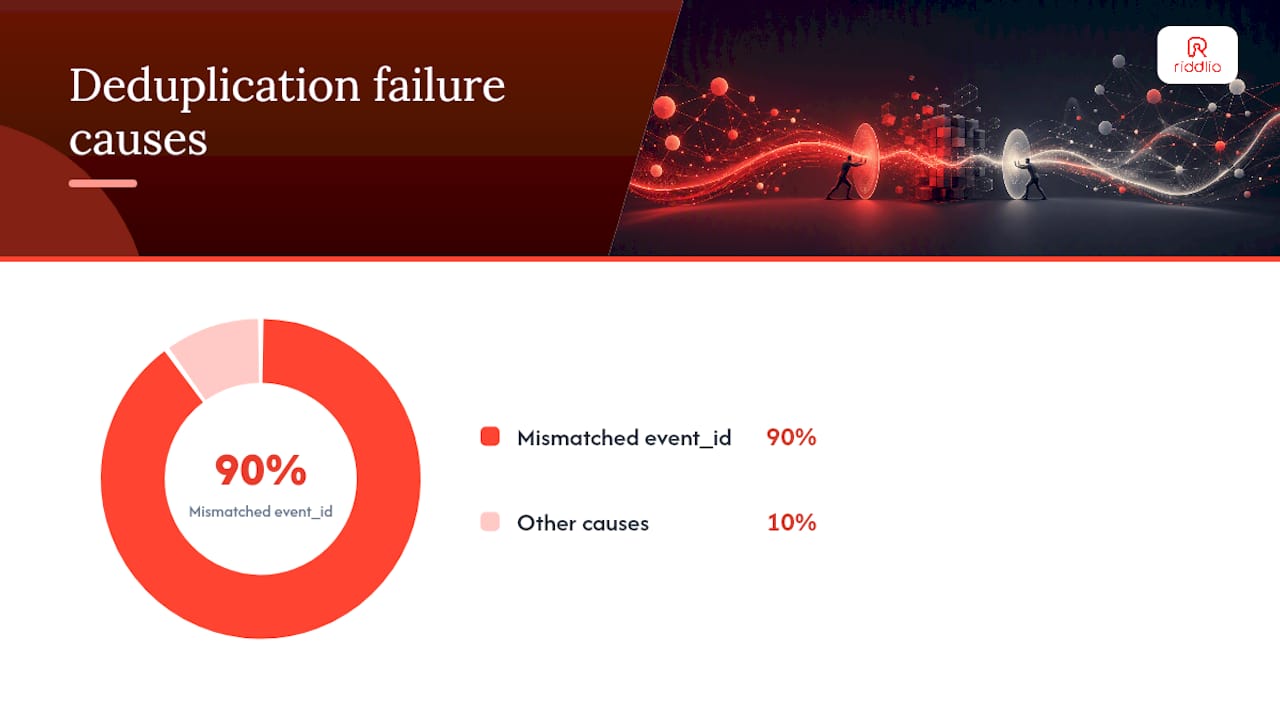
Meta merges a server event with its browser twin only when three things line up: an identical event_id, an identical event_name (case-sensitive), and an event_time close enough to look like the same action. Get any one of those wrong and you’ll count the same booking twice.
The mechanics matter more than they first appear:
- Meta holds incoming events for roughly 48 hours waiting for a matching partner to arrive before treating each one as unique.
- If both a browser event and a server event for the same booking arrive within about five minutes of each other, Meta keeps the browser version and discards the server duplicate.
- The most reliable
event_idfor a booking is the canonical booking or order ID itself, combined with the event name (something likebooking_48213_schedule), because it’s stable, unique, and generated once at the moment of confirmation rather than reconstructed twice from separate systems. - Missing or mismatched
event_idvalues are, according to implementation audits, the most common single cause of inflated conversion counts in booking accounts.
Spotting a deduplication failure is straightforward once you know where to look. Open Test Events, trigger a real booking, and check whether the event shows up twice under “Browser” and “Server” with no “Deduplicated” tag between them. If it does, compare the two payloads’ event_id values character by character. Nine times out of ten, one side is generating its own ID independently instead of reading the shared booking reference.
How do you test and troubleshoot a booking implementation?
Verification is not optional for booking events, given how much ad spend gets optimised against them. Meta’s Test Events tool is the fastest way to catch a broken payload before it skews a week of campaign data.
- Trigger a real booking through your widget or booking flow, using a test card or a $0 slot if your platform allows it.
- Check Test Events for both a Browser and a Server entry tagged against the same event, confirming the pixel and CAPI are both firing.
- Confirm the “Deduplicated” label appears rather than two separate rows, which tells you the
event_idmatch worked. - Check the Event Match Quality score on the server event. Anything below 6.0 usually means a missing hashed email or phone.
- Repeat weekly, not just at launch, since a platform update or a changed webhook payload can silently break the pipeline months later.
Pro Tip: Set a recurring calendar reminder to compare your payment processor’s confirmed-booking count against Ads Manager’s reported conversions every week. A gap wider than a few percent almost always means a deduplication or hashing bug crept in after your last deploy.
The most common troubleshooting culprits, in rough order of frequency, are: mismatched event_id values between browser and server, missing hashed user_data fields, forwarding the server’s IP address instead of the customer’s, and case mismatches in event_name. Work through those four before assuming the integration itself is broken.
What’s the operational checklist for launching booking events?
A few housekeeping items separate a booking integration that holds up for years from one that quietly degrades within months.
Before launch, confirm domain verification is complete in Meta’s Business settings, store your access token securely on the server (never in client-side code), and design your event_id scheme before writing any integration code, not after. Capture the customer’s real IP address and user agent string at the moment of booking, not at some later batch-processing step where that context is lost.
CRM-driven bookings need one extra habit: persist the fbclid at the moment a lead first lands on your site, then attach the stored fbc value when you eventually send the booking-confirmed or payment-completed event days later. Without that stored click ID, Meta has no way to link a booking that closes a week after the ad click back to the campaign that generated it.
A few operational limits to build around:
- Events can be sent with an
event_timeup to seven days old, but never dated in the future. - Batch multiple events into a single API call when volume allows; it reduces request overhead without changing deduplication logic.
- Hash every personal identifier before it leaves your server, and only retain
fbclidorfbcvalues for as long as your privacy policy and applicable regulation allow.
Why dual-signal tracking is the only defensible long-term approach
Treating the pixel and CAPI as competing options misses the point entirely. They’re not redundant, and running one instead of the other leaves a permanent, unrecoverable gap in your booking data. The businesses getting this right build for both from day one and let deduplication sort out the overlap.
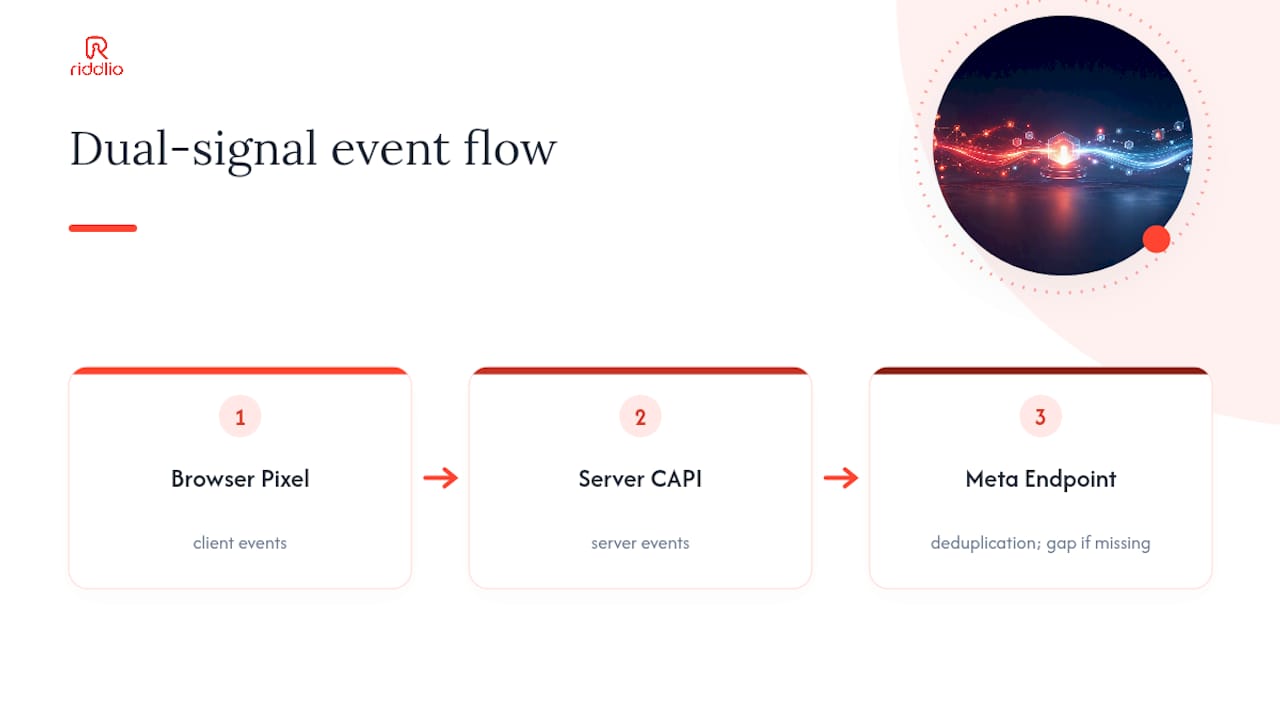
Progressive rollout beats a big-bang build in every case I’ve seen. Start with a native or webhook-based partner integration, prove EMQ and deduplication are behaving in Test Events, then graduate to server-side GTM or a custom build only once you have a genuine reason, like multi-platform routing or CRM-delayed conversions.
The teams that keep this reliable treat it as ongoing measurement governance, not a one-off setup task. That means scheduled audits, routine reconciliation against actual payment records, and staged rollouts for every change rather than pushing a new webhook straight to production.
— Iosif Beraru
How Riddlio feeds clean booking data straight into your CAPI setup
Every CAPI payload for a booking business lives or dies on the quality of the booking data feeding it, and that’s the layer most implementers underestimate. Riddlio’s online booking calendar generates a stable order ID at the moment a customer confirms a slot, along with the verified email and phone fields your integration needs to populate hashed user_data.

The white-label booking widget sits directly on your site rather than redirecting to a third-party page, which means fewer dropped sessions between the ad click and the confirmed booking, and fewer gaps between what your pixel sees and what actually happened. Combined with Riddlio’s payment processing, every confirmed booking carries a consistent order reference you can reuse as your event_id, the same reference across your booking record, your payment record, and your CAPI event.
If you’re mapping your booking flow to Meta’s event schema for the first time, start with Riddlio’s booking system overview to see how confirmations, payments, and customer contact fields fit together, then reach out through Riddlio’s support channels to work through the specifics of your CAPI integration.
Where to go for the official specs and worked examples
Bookmark these before you start building; you’ll need them mid-implementation more often than you’d think.
Meta’s Conversions API developer documentation is the authoritative source for parameter names, deduplication rules, and the exact request format. The Meta Business Help Center’s CAPI overview is the better starting point if you need the plain-English version before diving into the technical spec. Meta’s own bookings-specific guidance covers event mapping and best practice for booking and purchase flows in particular. For a worked no-code example, PixelFlow’s Calendly walkthrough shows a webhook-to-CAPI pipeline end to end, and Mako Metrics’ comparison of five setup methods is the fastest way to work out which integration path fits your stack.
Sources
- Conversions API - Meta for Developers - Facebook
- About Conversions API | Meta Business Help Center
- Track Calendly Bookings as Facebook Conversions Without Code
- How to Set Up the Meta Conversions API (5 Methods, Compared) | Mako Metrics
FAQ
What Is the Facebook Conversions API?
It’s a Meta tool that lets businesses send confirmed events, including bookings, purchases, and leads, directly from their servers to Meta rather than relying only on browser-based pixel tracking. Server events are matched to your pixel and processed the same way for measurement and ad optimisation.
Is Meta Conversions API Free?
Yes. CAPI itself carries no fee from Meta; you only pay for developer time, a server-side GTM host like Stape, or a partner tool such as PixelFlow if you choose a paid tier for higher volume.
How Do You Set Up Conversions API for Facebook Bookings?
Choose an integration path (native, webhook partner, server-side GTM, or custom), map your booking confirmation to a standard event like Schedule or Purchase, populate hashed user_data and a shared event_id, then verify everything in Test Events before going live.
Is Conversions API Worth the Setup Effort?
For any booking business running paid Meta ads, yes. Browser-only tracking now misses a meaningful share of confirmed bookings to ad blockers and privacy restrictions, and CAPI recovers that signal without requiring the customer to do anything differently.
Which Meta Event Should a Confirmed Booking Send?
Use Schedule for appointment or reservation confirmations with no payment attached, and Purchase whenever the booking includes a payment, since Purchase carries the value and currency fields Meta’s ROAS reporting depends on.