Double opt-in SMS is a two-step consent process where a subscriber provides their phone number, receives an automated confirmation message, and must reply with a keyword before they are added to your marketing list. For promotional messaging, you should use it. The TCPA, CTIA carrier guidelines, and platforms like Riddlio each treat it as the standard for defensible consent capture.
The core mechanics work like this:
- Collect the phone number via a web form, keyword, or booking widget
- Send an automated confirmation message asking the subscriber to reply with a keyword (typically YES)
- Parse the inbound reply and validate the keyword
- Update the subscriber’s profile status from Pending to Subscribed
The practical trade-off is straightforward: double opt-in adds one step of friction that slows list growth slightly, but the list you build is cleaner, more engaged, and far easier to defend in a carrier or regulatory dispute. For transactional flows — booking confirmations, payment receipts, appointment reminders — single opt-in is generally acceptable because the message is a direct response to a customer action, not unsolicited marketing.
Key takeaways
Double opt-in SMS is the most defensible consent method for promotional messaging, and building it correctly from the start costs far less than fixing a carrier complaint or regulatory inquiry later.
| Point | Details |
|---|---|
| Use double opt-in for promotional flows | Any marketing or campaign SMS requires confirmed consent; single opt-in leaves a thinner evidentiary record. |
| Capture all audit fields at enrolment | Store timestamp, IP, message IDs, inbound reply body, and confirmation token for every subscriber. |
| Separate transactional and promotional flows | Mixing promotional content into transactional messages can trigger TCPA liability if opt-in records are missing. |
| Test edge cases before go-live | Validate duplicate suppression, ambiguous reply handling, and timeout behaviour before sending to real subscribers. |
| Monitor complaint and conversion rates | A high complaint rate or a low opt-in conversion rate signals a list quality or delivery problem. |
| Riddlio for venue operators | Riddlio integrates consent capture into the booking flow, storing audit records alongside booking data in one system. |
Table of Contents
- What does double opt-in SMS actually mean?
- Why double opt-in produces better business outcomes
- Legal and carrier compliance for SMS opt-in
- Standard double opt-in flow and message templates
- Technical checklist for building a reliable double opt-in system
- How Riddlio supports an integrated double opt-in workflow
- How to monitor opt-in health and prepare for audits
- Common pitfalls and how to fix them
- Is double opt-in legally required for SMS?
- What records matter most for audit-grade compliance
- A practitioner’s view on opt-in strategy
- Riddlio makes double opt-in practical for venue operators
- Sources
What does double opt-in SMS actually mean?
Double opt-in, single opt-in, and SMS verification (OTP) are three distinct processes that get conflated constantly. Getting them confused creates real compliance exposure.
Double opt-in is a marketing consent mechanism. A person provides their number, receives a confirmation SMS, and must reply to confirm they want promotional messages. The purpose is to create an unambiguous, timestamped record of consent.
Single opt-in collects the number and adds the subscriber immediately, with no confirmation step. It is faster and grows lists more quickly, but the consent record is thinner. If a subscriber later claims they never signed up, you have less to show a carrier or regulator.
SMS verification (OTP/2FA) is an identity assurance tool, not a consent mechanism. A one-time passcode confirms that the person logging in controls the phone number. As ActiveProspect notes, using a marketing opt-in flow for security verification is inefficient and creates audit ambiguity — the two processes solve fundamentally different problems.
Here is when each method fits:
- Double opt-in: promotional SMS lists, marketing campaigns, abandoned cart reminders
- Single opt-in: transactional notices where the message is a direct response to a customer action (booking confirmations, receipts)
- OTP/2FA: account login, password reset, identity verification
Pro Tip: Never use your double opt-in confirmation message as a proxy for identity verification. Keep the flows in separate systems with separate message templates and separate database tables. Mixing them creates audit ambiguity that is difficult to untangle later.
Why double opt-in produces better business outcomes
The business case for double opt-in goes beyond legal defensibility. SimpleTexting reports that double opt-in filters invalid numbers and reduces spam complaints, which directly protects sender reputation with carriers.
The measurable benefits break down across three operational areas:
- Consent record quality: Every confirmed subscriber has a timestamped inbound reply attached to their profile. In a dispute, that record is far harder to challenge than a form submission alone.
- Complaint and bounce rates: Unconfirmed numbers — typos, fake entries, numbers entered by someone other than the owner — never make it onto your active list. Fewer invalid numbers means fewer undeliverable messages and fewer spam complaints.
- Carrier reputation: Carriers monitor complaint rates and block senders who exceed thresholds. A clean list keeps your complaint rate low, which protects your short code or long code from being flagged or suspended.
- Engagement rates: Subscribers who actively confirm want to hear from you. That intent shows up in open rates, click rates, and conversion performance.
Pro Tip: Treat your double opt-in conversion rate (the percentage of pending subscribers who confirm) as a list health indicator. Fix the source, not the symptom.
Legal and carrier compliance for SMS opt-in
No single statute mandates double opt-in by name, but the regulatory and carrier environment makes it the practical standard for promotional SMS.
The primary regulatory framework in the United States is the Telephone Consumer Protection Act (TCPA), enforced through FCC rules under Title 47. The TCPA requires prior express written consent before sending marketing messages to a mobile number using an autodialler or pre-recorded voice. “Written” in this context includes electronic records, which is why a timestamped inbound SMS reply is so valuable — it is a written confirmation in the subscriber’s own words.
The CTIA (the US wireless industry association) publishes messaging principles and best practices that carriers use to set their own compliance standards. CTIA guidance requires that opt-in language at the point of collection disclose:
- The programme name or brand
- Message frequency (e.g. “up to 4 msgs/month”)
- That message and data rates may apply
- How to opt out (STOP)
- How to get help (HELP)
The promotional vs transactional distinction matters here. Promotional messages — offers, campaigns, abandoned cart reminders — require explicit prior consent. Transactional messages — booking confirmations, receipts, appointment reminders sent in direct response to a customer action — are generally treated differently and may not require the same level of opt-in. Mixing promotional content into a transactional message can trigger reclassification and expose you to TCPA liability if you lack opt-in records for those recipients.
Klaviyo’s documentation notes that some carriers require double opt-in for specific message types, including abandoned cart reminders, regardless of what the law technically requires. That means double opt-in is sometimes a carrier technical requirement, not just a best practice.
This article provides general information only and is not legal advice. Consult qualified legal counsel for jurisdiction-specific application of TCPA and related regulations.
Standard double opt-in flow and message templates
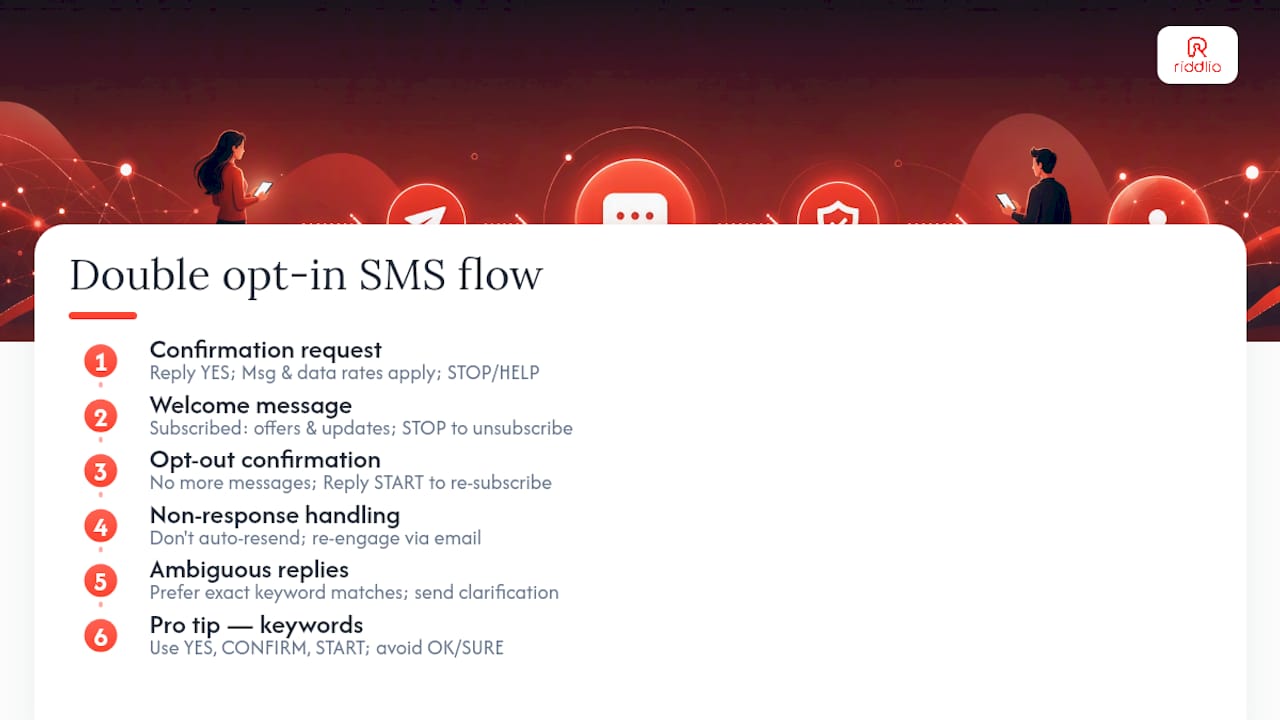
Iterable’s SMS double opt-in documentation defines the canonical four-step flow: collection, confirmation message, user reply, and profile status update. Subscribers who do not reply within 30 days remain unsubscribed and do not receive campaigns.
The four-step flow
- Collection: The subscriber enters their phone number via a web form, a booking widget, or by texting a keyword to your number. The profile is created with status: Pending.
- Confirmation message: Your system sends an automated SMS within seconds. The message must identify the sender, state the purpose, and include a clear reply instruction.
- Reply parsing: Your system listens for an inbound reply. It validates the keyword (YES, CONFIRM, or similar) and handles ambiguous or unexpected replies.
- Status update and legal disclaimer: On a valid reply, the profile updates to Subscribed. A follow-up welcome message is sent, including opt-out instructions.
Ready-to-use message templates
Confirmation request (sent immediately after collection):
[YourBrand]: You requested SMS updates. Reply YES to confirm. Msg & data rates may apply. Up to 4 msgs/month. Reply STOP to cancel, HELP for info.
Success / welcome message (sent after confirmed reply):
[YourBrand]: You’re subscribed! We’ll send you offers and updates. Reply STOP anytime to unsubscribe.
Opt-out confirmation (sent after STOP reply):
[YourBrand]: You’ve been unsubscribed. No more messages will be sent. Reply START to re-subscribe.
Non-response / ambiguous reply handling:
Do not automatically resend the confirmation message on non-response. Iterable’s guidance specifically recommends against re-triggering confirmations automatically, as repeated unsolicited messages to unconfirmed numbers can itself trigger complaints. If you want to re-engage pending subscribers, do so through a separate channel (email) rather than another SMS.
For ambiguous replies (e.g. “yep”, “sure”, “ok”), decide in advance whether your parser accepts them or treats them as invalid. The safest approach is to accept only exact keyword matches and send a gentle clarification message for anything else.
Pro Tip: Keep your accepted reply keywords to a short, unambiguous list: YES, CONFIRM, and START. Avoid keywords that are common words in casual conversation (“OK”, “SURE”) — they generate false positives when subscribers reply to the wrong thread.
Technical checklist for building a reliable double opt-in system
AWS Pinpoint’s implementation tutorial shows the core architecture: create an endpoint opted out by default, send the confirmation request, and only flip the endpoint to opted-in on receipt of the expected reply. That pattern applies regardless of which SMS platform you use.
Required technical components
- Two-way SMS inbound handling: Your number (short code or long code) must be configured to receive inbound messages and route them to a webhook or processing function.
- Webhook / API endpoint: A server-side endpoint that receives inbound message events, parses the reply keyword, and triggers the status update.
- Idempotent operations: Confirm that processing the same inbound message twice does not create duplicate subscriptions or send duplicate welcome messages. Use the inbound message ID as a deduplication key.
- Database schema changes: Add fields for opt-in status (Pending / Subscribed / Unsubscribed), confirmation token, and all audit fields listed below.
- Sender type selection: Short codes offer higher throughput and better deliverability for high-volume campaigns. Long codes (10DLC) are lower cost but require A2P 10DLC registration and have lower throughput limits. Choose based on expected volume and budget.
- Rate limiting: Cap outbound confirmation messages per number per hour to prevent accidental duplicate sends from form resubmissions.
Audit data fields to capture
Testing cases before go-live
- Valid reply: Confirm the profile flips to Subscribed and the welcome message sends once only.
- Ambiguous reply: Confirm the system sends a clarification message and does not subscribe the user.
- No reply (timeout): Confirm the profile stays Pending after 30 days and no further messages are sent.
- Duplicate form submission: Confirm only one confirmation message is sent and the second submission is deduplicated.
- STOP reply before confirmation: Confirm the profile moves to Unsubscribed and no further messages are sent.
- Carrier filtering test: Send test messages across multiple carriers (AT&T, Verizon, T-Mobile) to confirm delivery.
How Riddlio supports an integrated double opt-in workflow
Riddlio’s booking and management platform handles the consent capture step that most venue operators find hardest to build: collecting the phone number at a natural, high-intent moment and triggering the confirmation flow without a separate integration.
Here is how the workflow runs for an escape room operator using Riddlio:
- A customer completes a booking through Riddlio’s online booking widget and provides their mobile number.
- Riddlio triggers an automated double opt-in confirmation SMS to that number, identifying the venue and asking the customer to reply YES to receive promotional updates.
- The customer replies YES. Riddlio parses the inbound reply, updates the contact profile to Subscribed, and logs the confirmation timestamp and message IDs against the record.
- Riddlio schedules the welcome message and, from that point, the contact is eligible to receive SMS reminders and promotional campaigns.
The practical advantage of handling consent capture inside the booking platform is that the phone number, the booking record, and the opt-in audit trail live in the same system. There is no data sync between a form tool, an SMS platform, and a CRM — three potential points of failure that each need their own audit log.
Key benefits for venue operators:
- Single source of truth: Consent status, booking history, and contact details are in one record, which simplifies both day-to-day operations and audit preparation.
- Fewer integration points: No webhook plumbing between a form builder and an SMS API. The confirmation flow is built into the booking process.
- Audit-ready exports: Contact records include opt-in timestamps and message IDs, which can be exported for carrier or regulatory review.
Pro Tip: Capture opt-in consent at the booking step rather than a separate post-booking email. Conversion rates for confirmation replies are significantly higher when the subscriber has just completed a transaction and is actively engaged with your brand.
How to monitor opt-in health and prepare for audits
Monitoring your double opt-in funnel is not a set-and-forget task. Carrier complaint thresholds shift, list quality degrades over time, and a sudden spike in pending non-confirmations often signals a bot attack or a broken confirmation message.
Key metrics to track
| Metric | Recommended alert threshold | What it signals |
|---|---|---|
| Pending confirmation rate | More than 60% of new enrolments pending after 48 hours | Broken confirmation message or delivery failure |
| Opt-in conversion rate | Low percentage | Poor message copy, wrong channel, or bot traffic |
| Spam complaint rate | Low percentage | List quality problem or message frequency too high |
| Opt-out rate per campaign | Above 2% | Audience mismatch or content relevance issue |
| Bounce / undeliverable rate | Above 5% | Invalid numbers entering the list |
Audit export format
For a carrier or regulatory inquiry, prepare an export with these fields in CSV or JSON format:
- Subscriber phone number (E.164 format)
- Enrolment timestamp (UTC)
- Enrolment source (form ID or keyword)
- Outbound confirmation message ID and body
- Inbound reply message ID, body, and timestamp
- Parsed keyword
- Final opt-in status and status change timestamp
- Opt-out timestamp and trigger (if applicable)
Retain these records for a minimum of four years, which aligns with the TCPA statute of limitations for private claims. Store them in an immutable or append-only format where possible — a record that can be edited after the fact is weaker evidence than one that cannot.
Responding to a carrier or regulator inquiry
- Acknowledge the inquiry within 24 hours.
- Pull the audit export for the specific phone numbers or date range cited.
- Confirm that each number in dispute has a complete consent record (enrolment timestamp, outbound message ID, inbound reply ID).
- If a number lacks a complete record, treat it as unconfirmed and suppress it immediately.
- Provide the export to the carrier or regulator along with a written description of your opt-in process.
Common pitfalls and how to fix them
Even well-designed double opt-in flows break in predictable ways. Here are the most common failures and their fixes.
Reply parsing errors
Symptom: Subscribers reply YES but are not subscribed. Quick fix: Check that your inbound webhook is receiving events and that your keyword comparison is case-insensitive. Long-term fix: Add logging for every inbound message event, including those that do not match a keyword, so you can diagnose parsing failures without relying on subscriber reports.

Short code vs long code delivery differences
Symptom: Confirmation messages deliver on one carrier but not another. Quick fix: Test across AT&T, Verizon, and T-Mobile using real SIM cards, not emulators. Long-term fix: For high-volume promotional programmes, register a dedicated short code. For lower-volume use, register your 10DLC long code with the A2P 10DLC registry and ensure your campaign use case is correctly classified.
Carrier filtering of confirmation messages
Symptom: Confirmation messages are delivered inconsistently or not at all. Quick fix: Review your message body for words or patterns that trigger spam filters (excessive capitalisation, URL shorteners, certain promotional phrases). Long-term fix: Use a plain-text confirmation message with no URLs. Keep it under 160 characters to avoid message concatenation issues.
Promotional content in transactional messages
Symptom: A booking confirmation includes a discount offer, and the customer later claims they never opted in to marketing. Quick fix: Remove all promotional content from transactional message templates immediately. Long-term fix: Separate transactional and promotional message flows at the platform level with distinct templates, distinct sender IDs where possible, and distinct consent records.
Duplicate confirmation sends
Symptom: A subscriber receives two or three confirmation messages. Quick fix: Add a deduplication check: if a pending record already exists for a number, do not send another confirmation. Long-term fix: Make your enrolment endpoint idempotent using the phone number as a deduplication key within a defined window (e.g. 24 hours).
Post-deploy verification checklist
- [ ] Valid YES reply triggers subscription and single welcome message
- [ ] STOP reply before confirmation moves profile to Unsubscribed
- [ ] Duplicate form submission sends only one confirmation
- [ ] Ambiguous reply sends clarification, does not subscribe
- [ ] Pending profiles are excluded from campaign sends
- [ ] Audit fields are populated for every enrolment event
Is double opt-in legally required for SMS?
The short answer: no statute explicitly mandates double opt-in by name, but that framing understates the practical reality.
The TCPA requires prior express written consent for promotional SMS. Double opt-in is the most defensible way to prove that consent exists. Single opt-in is not prohibited, but it leaves you with a thinner evidentiary record if a subscriber disputes consent or a carrier investigates a complaint.
Where double opt-in becomes effectively required:
- Carrier rules: As Klaviyo documents, some carriers require double opt-in for specific message types, including abandoned cart reminders. Sending those message types without a confirmed opt-in can result in filtering or suspension.
- Platform policies: Many SMS platforms will not allow promotional campaigns to unconfirmed subscribers, regardless of what the law technically permits.
- High-risk programmes: Any programme with a high complaint history or operating in a regulated industry (finance, healthcare) should treat double opt-in as non-negotiable.
Where single opt-in is generally acceptable:
- Transactional messages sent in direct response to a customer action (booking confirmations, receipts, shipping notifications)
- Internal operational alerts where the recipient is an employee or known contact
This is general information, not legal advice. Consult qualified legal counsel for jurisdiction-specific guidance on TCPA compliance and carrier requirements.
What records matter most for audit-grade compliance
A compliance team designing its recordkeeping policy should treat the audit record as the primary deliverable of the opt-in system, not an afterthought.
The critical fields, and why each one matters:
- Enrolment timestamp (UTC): Establishes when consent was initiated. Without it, you cannot prove the subscriber opted in before you sent the first message.
- Enrolment source (form ID or keyword): Identifies which touchpoint collected the number. If a form had incorrect disclosure language, you need to know which subscribers were affected.
- Subscriber IP address: Links the form submission to a device. Useful for detecting bot submissions and for demonstrating that a real person initiated the enrolment.
- User agent string: Supplements the IP address for bot detection.
- Outbound confirmation message ID and body: Proves the exact disclosure you sent. If your message body changes over time, the stored body shows what this specific subscriber received.
- Inbound reply message ID and body: The strongest single piece of evidence. A real inbound message from the subscriber’s number, with a carrier-assigned message ID, is very difficult to dispute.
- Parsed confirmation keyword: Documents what your system accepted as a valid confirmation.
- Confirmation token: A unique identifier per enrolment that prevents replay attacks and ties the inbound reply to the specific outbound confirmation.
Retention and export
| Record type | Minimum retention | Format |
|---|---|---|
| Opt-in consent records | 4 years | Immutable CSV or JSON |
| Opt-out records | 4 years | Immutable CSV or JSON |
| Message logs (outbound) | 2 years | Platform export or database |
| Message logs (inbound) | 2 years | Platform export or database |
Edge cases worth planning for: multi-channel enrolment (a subscriber who opts in via email and then confirms via SMS needs both records linked), Smart Opt-In flows where the platform pre-populates the reply, and non-responses where the pending record must be retained to show the subscriber was never activated.
A practitioner’s view on opt-in strategy
There is a version of this conversation that treats double opt-in as a compliance checkbox — something you implement to satisfy a carrier requirement and then forget. That framing misses the more interesting strategic point.
The businesses that build the most durable SMS programmes are the ones that treat the confirmation step as a quality filter, not a hurdle. Every subscriber who does not reply YES is a subscriber who was either not real, not interested, or not paying attention. Removing them before they receive a single campaign message means your complaint rate, your open rate, and your conversion rate all start from a cleaner baseline.
Twilio’s compliance guidance makes a point worth taking seriously: implementing double opt-in now helps future-proof your programme against stricter carrier standards. Carrier policies have tightened consistently over the past several years, and the direction of travel is clear. Programmes built on confirmed consent are structurally better positioned to absorb those changes than programmes built on the minimum the law currently requires.
The one thing practitioners consistently underestimate is the audit trail. Most teams think about the opt-in flow as a user experience problem. The compliance team thinks about it as an evidence problem. Both are right, but the evidence framing tends to produce better system design — because it forces you to ask, at every step, “what would I need to show a regulator to prove this subscriber consented?” Answer that question in your database schema, and the UX usually follows naturally.
Riddlio makes double opt-in practical for venue operators
Most escape room operators are not running a dedicated SMS compliance team. They are managing bookings, staff, and customer experience simultaneously. That is exactly where Riddlio’s integrated approach pays off.

Riddlio captures phone numbers through its booking calendar at the highest-intent moment in the customer journey: the point of booking. From there, the double opt-in confirmation flow triggers automatically, the inbound reply updates the contact profile, and the audit record is stored alongside the booking data. No separate SMS platform to configure, no webhook to maintain, no manual export to reconcile.
For venue operators ready to set up SMS marketing with confidence, explore Riddlio’s SMS reminders and messaging features or visit Riddlio to start a trial and see how consent capture fits into your existing booking workflow.
Sources
- Opt-in and opt-out text messages: definition, examples, and guidelines | Twilio
- Double Opt-in for SMS Marketing - How Does it Work?
- Tutorial: Setting up an SMS registration system
- Understanding the double opt-in process | Klaviyo Help Center
- Rules & regulations (Title 47) | FCC
This article is general information, not a substitute for advice from a qualified lawyer. Consult a qualified legal professional about your own circumstances before acting on anything here.