Get your embed code or hosted booking link, then use your platform’s built-in appearance settings to match your logo, colours and fonts before you touch any code. Custom CSS should only handle small, well-tested polish once the defaults are live. Run a full end-to-end QA check before publishing, and if you want to see this done well, look at how white-label booking tools handle it for escape room venues.
TL;DR:
- Use the platform’s appearance settings to match branding, and only add custom CSS after exhausting default options and testing thoroughly.
- Choose the appropriate embed pattern—inline, pop-up, or hosted page—to suit your page layout and user experience goals.
- Keep form fields minimal by capturing only essential information upfront, and use conditional logic to request more details later if necessary.
- Sync your widget with calendar and payment systems carefully, and verify all automation and redirection work properly through comprehensive QA.
- Prioritize security by using HTTPS, PCI DSS compliance, and limiting data collection, while involving a developer only for complex customizations.
Table of Contents
- What is booking widget customisation and where do you start?
- Brand the widget with built-in settings first
- What form fields should your booking widget actually collect?
- Integrations: calendar sync, payments and post-booking redirects
- Testing and QA: the checklist to run before you publish
- Riddlio in practice: a white-label widget built for real operations
- Security considerations in customising booking widgets
- When to use platform settings vs when to hire a developer
- Riddlio: a direct path to a branded booking widget that actually runs your venue
- Sources
What is booking widget customisation and where do you start?
Booking widget customisation is the process of taking a generic booking calendar and reshaping it, visually and functionally, so it feels like part of your own website rather than a bolted-on third-party tool. It covers everything from colours and fonts to form fields and payment flow. Before any of that, you need the actual code or link.
Log into your booking platform’s dashboard and look for a section usually called “Embed,” “Widget,” or “Website Integration.” Most platforms give you three options, and picking the right one matters more than people expect.
- Inline embed — a snippet of code (often an iframe or script tag) that places the full calendar directly on a page. Best when booking is the main job of that page.
- Pop-up or modal — a button that opens the widget in an overlay. Good when you want to keep a page uncluttered but still offer instant booking.
- Hosted booking page — a separate page your booking provider hosts for you, reachable through a vanity URL you can share in emails, social bios or SMS campaigns.
Platforms differ in how they typically expose these patterns. If you’re on WordPress, you’ll usually paste the snippet into a custom HTML block or use a dedicated embed block; page builders like Elementor or Divi tend to have a “Custom Code” or “Embed” widget for the same job. For a book-now button, wrap the same embed code in a click trigger so it opens the modal instead of loading inline. Zenbooker’s help documentation breaks these three patterns down clearly if you want more detail before you commit.
Brand the widget with built-in settings first
Every decent booking platform ships with an appearance or branding pane, and that’s where most of your customisation work should happen. Set your primary colour to match your logo, choose a button style, pick a font family, and upload your logo directly. This gets you most of the way to a widget that looks native to your site, with zero risk of breaking anything.
The smarter platforms follow what UX designers call progressive disclosure: they show you a solid default configuration up front, then tuck the finer controls (spacing, secondary colours, advanced layout) behind an “Advanced” toggle so you’re not overwhelmed on day one. That’s deliberate design, not a missing feature. It means non-technical staff can launch something respectable in minutes, while anyone who wants pixel-level control still has a path to it.
Once you’ve exhausted the appearance settings and still need something specific, custom CSS is your next step. Follow a few rules here:
- Use the class names and selectors listed in your platform’s own documentation, never ones you’ve guessed from browser inspection.
- Avoid targeting auto-generated or scrambled class names (the kind that look like
sc-abCDe) because they change without warning and your styling breaks silently. - Test the full booking flow again after every CSS change. Visual tweaks can quietly interfere with the scripts driving your calendar or checkout.
- Check colour contrast and keyboard focus states after styling, particularly on buttons and date pickers.
Bokun’s widget customisation documentation is blunt about this: CSS overwrites can break your booking flow, and testing end-to-end after every edit isn’t optional. Preview your widget in both light and dark themes if your site supports either, since a colour that reads fine on white can vanish on a dark background.
Pro Tip: Screenshot your default widget styling before you make any CSS changes. If something breaks two weeks later, you’ll have a known-good state to roll back to instead of guessing what changed.
What form fields should your booking widget actually collect?
Every field you add is friction, and friction costs bookings. Keep the initial form lean: name, contact details and the booking slot itself. Anything beyond that (dietary needs, special requests, group details) can usually wait until after the booking is confirmed, either in a follow-up email or a post-checkout page.
Where you do need extra information up front, use conditional logic instead of a static wall of fields. Show a “number of participants” field only when it’s relevant, or reveal a group discount code field only if someone selects a group size above a threshold. Form builders like Jotform are built specifically around this: adding fields and branching logic without touching code, which keeps the form short for most bookers while still capturing detail from the ones who need it.
Practical rules worth locking in:
- Mark only genuinely essential fields as required. Every mandatory field is a chance for someone to abandon the form.
- Prefill fields via query strings or saved CRM data for repeat customers. Nobody wants to retype their email for the third time.
- Use blocking rules to filter out unqualified bookings before they hit your calendar. YouCanBookMe’s configurable forms let you show or hide fields and block certain combinations entirely.
- Validate contact fields (email format, phone length) at the point of entry, not after submission.
Integrations: calendar sync, payments and post-booking redirects
Your widget’s styling means nothing if the plumbing behind it fails. Sync your booking calendar with Google Calendar or Outlook and set clear buffer rules so back-to-back bookings can’t overlap. Most no-code widgets bundle this alongside basic payment support, which is exactly the kind of setup that lets a small team deploy fast without a developer.
On payments, confirm which gateways your widget supports, and always run new configurations on test or sandbox keys before switching to live ones. Know whether your setup captures payment immediately or just authorises it, and confirm your refund process actually works before a real customer needs it.
- Map your confirmation page to a clear thank-you message or a vanity URL customers will recognise in follow-up emails.
- Confirm automated email and SMS confirmations trigger correctly and match your booking details.
- Tag your booking links with UTM parameters if you’re running campaigns, so your CRM can attribute bookings to the right source.
Testing and QA: the checklist to run before you publish
Don’t publish on faith. Work through this in order every time you make a meaningful change to the widget.
- Book a full test slot on desktop, then repeat on a phone and tablet, checking that layouts don’t clip or overlap at narrow breakpoints.
- Confirm the booking lands correctly on your calendar with the right timezone, for both one-off and recurring slots.
- Run a test payment using sandbox or test keys, then confirm the refund process completes cleanly.
- Check that prefilled fields populate correctly, required fields actually block submission when empty, and your redirect or confirmation message displays as expected.
- Tab through the entire form using only your keyboard, and check colour contrast against WCAG guidance for buttons, labels and date pickers.
Skipping any one of these steps is how businesses discover a broken checkout from an angry customer instead of a QA pass.
Riddlio in practice: a white-label widget built for real operations
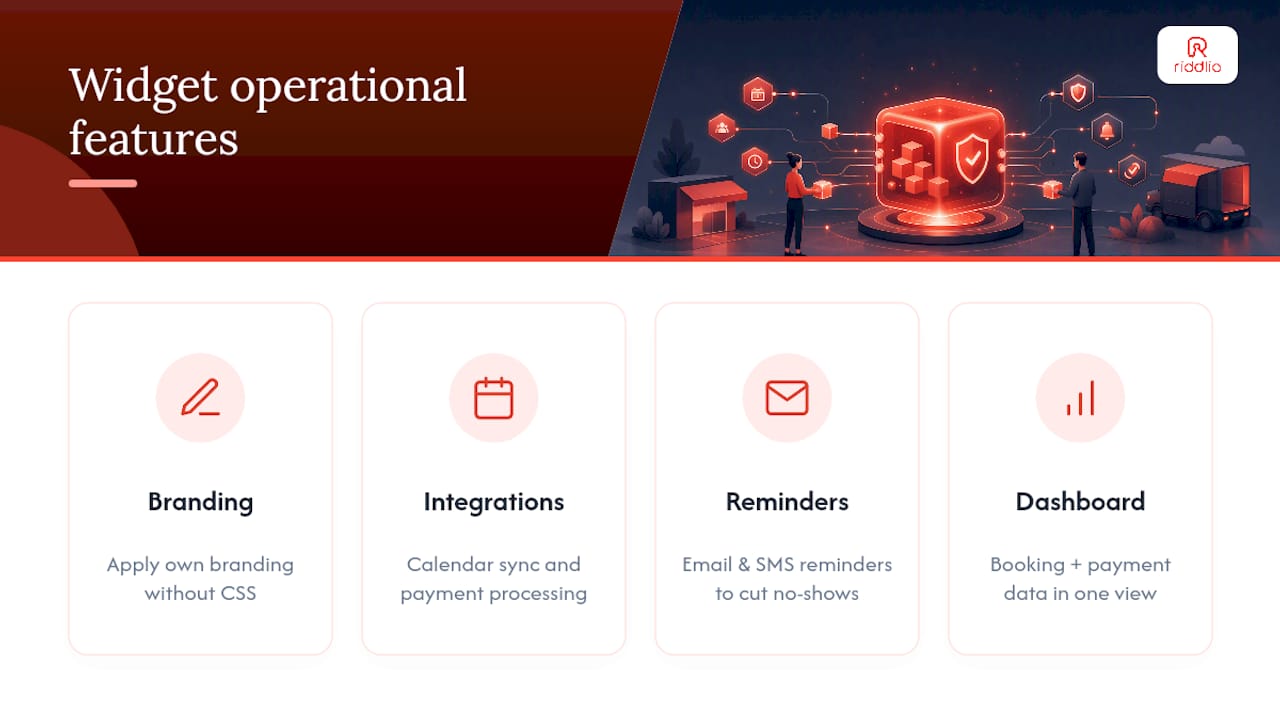
Riddlio’s booking widget is built white-label from the ground up, so escape room operators can apply their own branding without wrestling raw CSS for basic changes. It plugs into calendar sync and payment processing directly, and pairs with automated email and SMS reminders to cut down on no-shows, one of the more stubborn cost centres in the entertainment booking space. The same dashboard surfaces booking and payment data in one operational view, so venue managers aren’t checking three different tools to confirm a slot filled and paid correctly.
Security considerations in customising booking widgets
Every field you add or gateway you connect expands your attack surface, so security has to be part of the customisation decision, not an afterthought. Any personal data your form collects (names, emails, phone numbers, and especially payment details) needs to move over encrypted connections. Confirm your booking provider serves the widget over HTTPS, and never embed a booking form on a page still running plain HTTP.
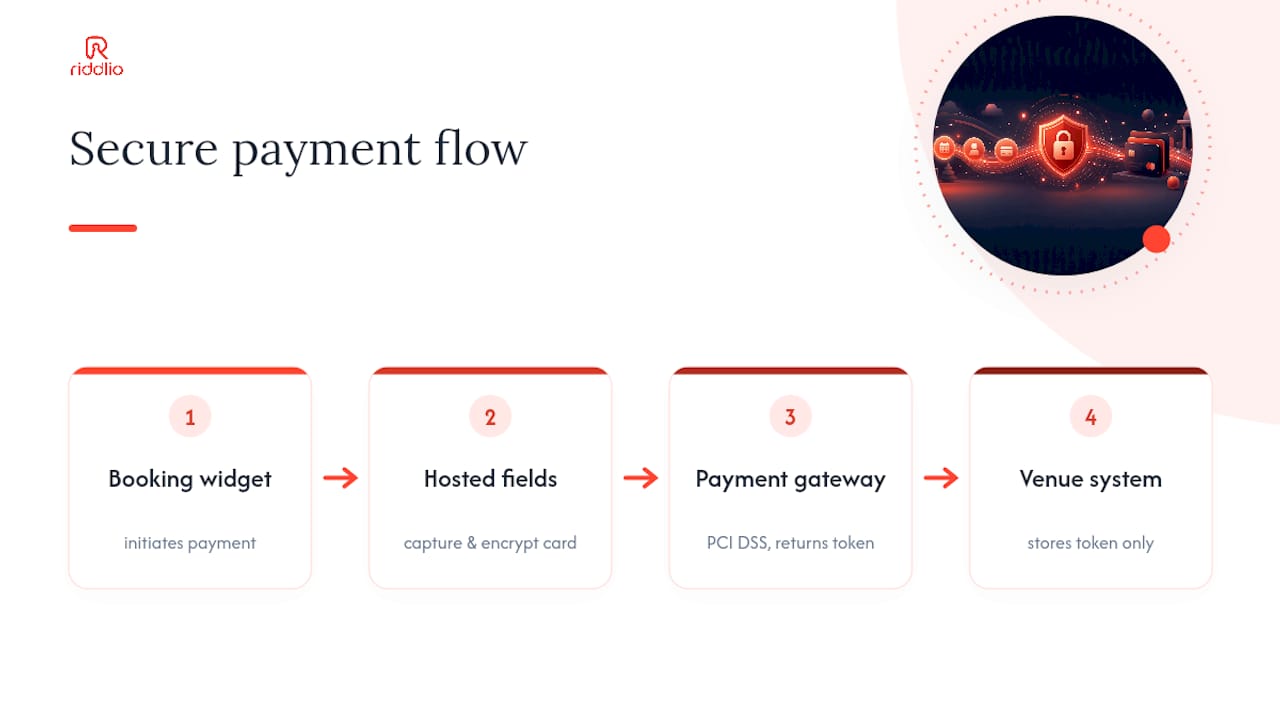
For payments specifically, check whether your provider is PCI DSS compliant and whether card data ever touches your own servers or stays entirely within the payment gateway’s hosted fields. The safer setups keep raw card numbers out of your infrastructure altogether, passing tokens back and forth instead of storing anything sensitive yourself.
Custom fields that collect extra personal information (health notes, ID numbers, addresses) raise your data privacy obligations, particularly if you serve customers in regions covered by GDPR or similar frameworks. Only collect what you genuinely need, and check your booking platform’s data retention settings so you’re not holding customer details longer than necessary.
Watch your test versus live API keys closely during setup. Leaving test keys active on a public site is a minor annoyance; leaving live keys exposed in a public script tag or a misconfigured embed is a real problem. Rotate keys if you ever suspect one has leaked, and restrict who on your team has access to your payment gateway’s live credentials.
When to use platform settings vs when to hire a developer
CSS is fine for last-mile polish, not structural change. Bring in a developer for multi-location embeds, complex availability rules, or heavy DOM overrides, and weigh the cost against the risk before you touch anything custom.
— Iosif Beraru
Riddlio: a direct path to a branded booking widget that actually runs your venue
Some booking platforms combine a booking form, calendar tool and payment gateway into one white-label widget built specifically for escape room venues. They offer branding controls, calendar sync, payment processing and automated SMS and email reminders in one place, avoiding the need to stitch plugins together or hire a developer to keep systems talking to each other.

That means fewer no-shows, less admin chasing payment confirmations, and one dashboard that actually shows you what’s booked, what’s paid, and what’s free tonight. If your current setup involves duct-taping three tools together, take a look at Riddlio’s online booking calendar and see what a purpose-built alternative looks like for your venue.
Sources
- How to customize your widgets | Bokun Help
- Progressive disclosure — Justinmind
- Booking form templates and customisation — Jotform
- Configurable booking forms — YouCanBookMe