Automated review requests work, and you can set up your first one today. They are system-generated invitations sent by SMS, email, WhatsApp, or in-app after a defined trigger fires, such as a booking completing or a payment clearing. Pick one trigger, pick one channel, and schedule a single test message. That is the whole starting point.
Three things to know before you go further:
- Riddlio supports booking-completion triggers and automated SMS messaging for venue operators, making it a practical implementation path if you run an escape room or activity venue.
- ACMA (the Australian Communications and Media Authority) governs commercial electronic messages under the Spam Act 2003. Every automated message you send must comply.
- Google Business Profile is the primary review destination for most Australian SMBs, followed by Facebook and ProductReview.com.au.
Table of Contents
- What are automated review requests, and how do they work?
- Why automate review requests? The real business case
- What features should you look for in a review automation tool?
- How to set up automated review requests: a step-by-step workflow
- Channel-specific best practices: SMS, email, WhatsApp, and in-app
- Ready-to-use message templates for SMS and email
- Australian compliance: Spam Act, Privacy Act, and review platform rules
- How to protect deliverability and avoid spam filters
- Which metrics should you track, and what are realistic benchmarks?
- Common problems with automated review requests and how to fix them
- Key takeaways
- The part most guides skip over
- Riddlio gives escape room venues a faster path to review automation
- Useful sources and official guidance
What are automated review requests, and how do they work?
An automated review request is a message your system sends without anyone pressing send. A trigger fires, a template fills with the customer’s name and booking details, and the message goes out on the channel you chose. No staff involvement after the initial setup.
The trigger is the key variable. Common ones include booking or appointment completion, purchase confirmation, delivery confirmation, and ticket or experience redemption. Each maps to a different business type.
Three everyday examples show how this plays out in practice:
- Escape room: — SMS sent 30 minutes after the game ends, while the adrenaline is still fresh. “Hi [Name], hope you escaped! Mind leaving us a quick Google review? [link]”
The mechanics underneath rely on APIs, webhooks, or simpler patterns like BCC on an invoice email or a CSV upload. Twilio’s appointment reminders documentation shows how multichannel trigger workflows connect SMS, email, and WhatsApp through a single studio editor, which is a useful reference if you are building a custom integration.
Why automate review requests? The real business case
The short answer: volume and consistency. A business that asks every customer for a review will always outpace one that relies on staff to remember.
Statista’s data on local business recommendation methods confirms that word-of-mouth and online reviews remain among the leading ways customers choose a local business. More reviews, posted consistently, improve your Google ranking in local search and increase conversion on your listing.
The operational benefits stack up quickly:
- Reputational resilience: When you combine automated requests with a private feedback routing step, unhappy customers get a direct line to you before they post publicly. Smart systems, as ReviewStream.ai describes, route customers showing dissatisfaction signals to a private survey rather than a public review page.
The timing advantage is real for experience-based businesses. An escape room that sends an SMS 30 minutes after the game ends catches customers while they are still buzzing. That same message sent 48 hours later gets a fraction of the response.
What features should you look for in a review automation tool?
Not every tool is built the same. The checklist below separates the features that genuinely move the needle from the ones that look good in a demo.
Core delivery features:
- Multichannel support: SMS, email, WhatsApp, and in-app at minimum
- Trigger rules: event-based (booking complete, invoice paid, delivery confirmed) rather than just time-based
- Personalisation tokens: customer name, service type, location, date of visit
- Follow-up sequencing: a second message for non-responders, typically on day 3 or day 5
- Negative-feedback capture: a private routing step before the public review link
Integration and technical needs:
- API and webhook support for real-time triggers
- CSV import and BCC-on-invoice patterns for businesses without a developer
- Native connectors for common booking, POS, and CRM systems
- Zapier or Make compatibility for everything else
Operational controls:
- Rate limiting to avoid sending too many messages in a short window
- Do-not-contact filters and duplicate prevention
- Multi-location rules so a customer at one venue does not receive messages from another
- Opt-out handling that updates instantly across all channels
Yotpo’s automated review request documentation covers follow-up sequencing and deliverability considerations in detail. ReputationStacker’s feature set shows how CRM and POS integrations, combined with timing controls, work in practice for SMB operators.
How to set up automated review requests: a step-by-step workflow
This is the sequence that works for a busy manager who needs to go from zero to live without a developer on call.
-
Choose your review destinations. Google Business Profile is the priority for most Australian businesses. Add Facebook and ProductReview.com.au if your category has active communities there. Decide upfront where you want to send customers, because your message template needs those links.
-
Pick a trigger and connect your system. The booking-complete event is the cleanest trigger for service and experience businesses. For e-commerce, use delivery confirmation. Connect via API or webhook if your platform supports it. If not, a BCC on your invoice email or a weekly CSV upload gets you started immediately, as AutoReview’s onboarding patterns demonstrate.
-
Write your first message and one follow-up rule. Keep the first message short and personal. Add a private feedback link before the public review link so dissatisfied customers have somewhere to go. Set a single follow-up for day 3 targeting non-openers only.
-
Set your deliverability basics. Confirm your sending domain has SPF and DKIM records configured. Set a from-address that matches your business name. Apply rate limits and map your personalisation fields (customer name, service, date) before you go live.
-
Run a pilot with 10 real customers. Watch deliverability, open rates, and click-to-review conversion for two weeks. Adjust timing or copy based on what you see. Podium’s setup guide recommends iterating on timing first, since a well-timed message consistently outperforms a better-written one sent at the wrong moment.
Pro Tip: Start with one trigger and one location. Measure the lift in review volume over 30–60 days before adding a second channel or building out segmentation. Complexity added too early is the most common reason pilots stall.
Channel-specific best practices: SMS, email, WhatsApp, and in-app
Each channel has a different conversion profile, and the right choice depends on your business model and customer relationship.
SMS is the highest-converting channel for time-sensitive, experience-based businesses. Send within 30–60 minutes of the event. Keep it under 160 characters, include your business name in the first 20 characters, use a one-tap link, and always include opt-out instructions (“Reply STOP to unsubscribe”). Riddlio’s SMS reminder capability is built around exactly this pattern for escape room and activity venue operators.
Email suits e-commerce and service businesses where the customer relationship is less immediate. Schedule 24–72 hours after delivery or service completion. Use a subject line that references the specific service (“How was your session at [Venue]?”), keep the body short, and make the star-rating CTA the first thing visible on mobile. Mobile-friendly templates are not optional: most review request emails are opened on a phone.
WhatsApp works best for repeat customers and conversational follow-ups. Use only approved WhatsApp Business API channels, keep rich media to a minimum in the first message, and treat it as a two-way channel. Two-way SMS support and WhatsApp are particularly effective when customers want to ask a question before leaving a review.
In-app has the lowest friction of any channel for logged-in customers. A one-tap review button surfaced in the order history or booking confirmation screen converts well because the customer is already in your environment. The trade-off is reach: only customers who open your app see it.
Quick channel selection guide:
- Experience or venue business: SMS first, email as follow-up
- E-commerce: email first, SMS for high-value customers
- Repeat service customers: WhatsApp or in-app
- Multi-location with diverse customer types: multichannel with automated routing to the right platform
Ready-to-use message templates for SMS and email
These templates are starting points. Swap in your personalisation tokens and test two variants before settling on one.
SMS templates:
- “Hi [Name], thanks for playing [Room Name] at [Venue]! Got 60 seconds? Leave us a Google review: [link]. Reply STOP to opt out.”
- “[Venue] here — hope you loved your experience, [Name]. Your review helps others find us: [link]. Reply STOP to unsubscribe.”
Email subject line variants:
- “How was your escape at [Venue], [Name]?”
- “[Name], we’d love your feedback on [Service]”
- “Quick question about your visit to [Venue]”
Email body (short version):
Hi [Name],
Thanks for visiting [Venue] on [Date]. We’d love to hear what you thought.
[Leave a Google Review] [Leave a Facebook Review]
Had an issue? Let us know privately here: [private feedback link]
Thanks, [Staff Name] at [Venue]
Personalisation tokens to map: customer name, service or room name, venue location, visit date, staff name. Place the private feedback link above the public review links, not below. Customers who are unhappy will click the first option they see.
A note on AI tools: use them to draft and refine message copy, not to generate fake reviews. Fabricated reviews violate Google’s policies, Facebook’s terms, and Australian consumer law. AI-assisted drafting is fine; AI-generated fake testimonials are not.
Australian compliance: Spam Act, Privacy Act, and review platform rules
Australian law puts clear obligations on any business sending automated commercial messages. Getting this wrong is not just a reputational risk — ACMA can issue infringement notices and significant fines.
Spam Act 2003 (ACMA): Every commercial electronic message must identify the sender clearly, include a functional unsubscribe mechanism, and be sent only with the recipient’s consent (express or inferred). ACMA’s guidance covers what counts as inferred consent and how long it lasts. The key practical rule: if a customer gave you their email or phone number to make a booking, you likely have inferred consent to send a single follow-up review request, but you must still include an opt-out.
Privacy Act 1988 / Australian Privacy Principles (APPs): Under the APPs, you can only use personal information (name, email, phone) for the purpose it was collected or a directly related purpose. Sending a post-booking review request is generally a directly related purpose. Keep records of how and when consent was obtained, and honour deletion requests promptly. The Office of the Australian Information Commissioner (OAIC) publishes plain-language guidance on APP obligations.
Review platform rules: Google, Facebook, and ProductReview.com.au all prohibit review gating, which means you cannot show the review link only to customers you expect to rate you highly. You can route unhappy customers to a private feedback form, but you cannot suppress the public review option entirely for that group. Incentivised reviews (discounts, free products in exchange for a review) violate platform terms and the ACCC’s guidelines on misleading conduct.
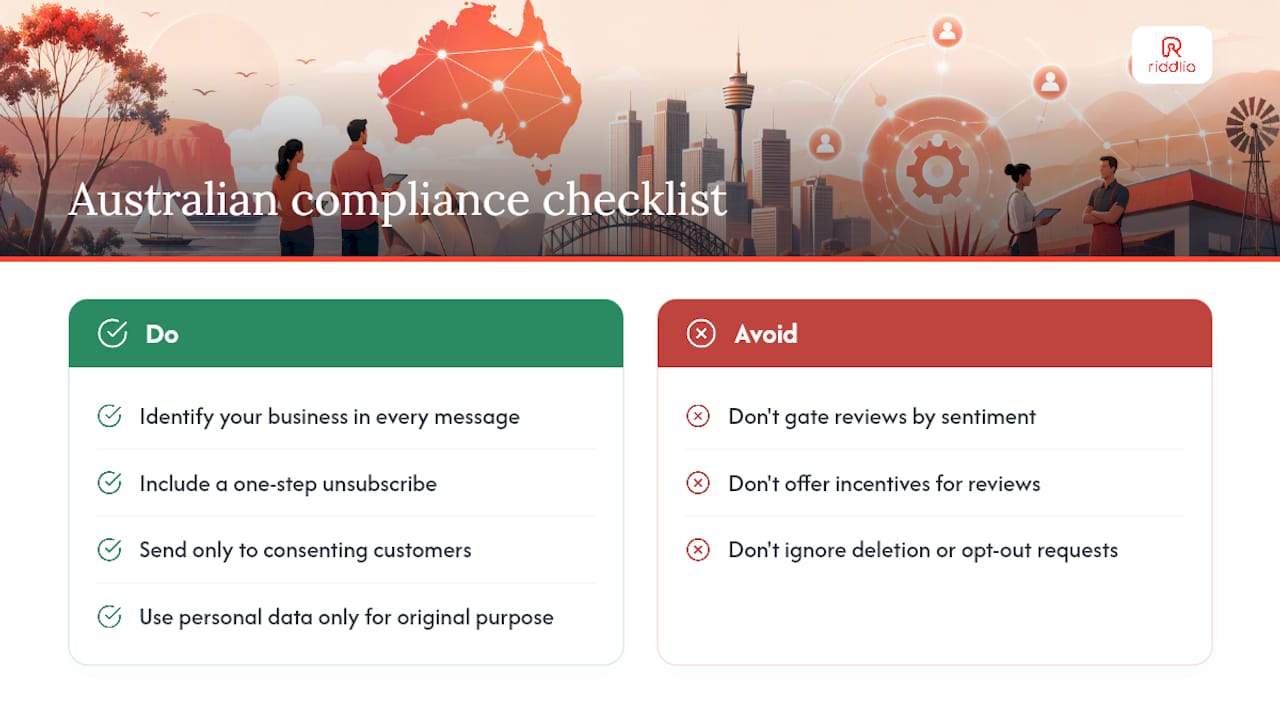
Compliance checklist for Australian SMBs:
- Identify your business name clearly in every message.
- Include a one-step unsubscribe in every SMS and email.
- Send only to customers who have given consent (express or inferred via a booking or purchase).
- Use personal data only for the purpose it was collected.
- Never gate reviews by customer sentiment — offer the review link to all customers.
- Keep records of consent and opt-outs.
- Check ACMA (acma.gov.au) for spam rules and OAIC (oaic.gov.au) for privacy obligations.
This is general information, not legal advice. Confirm your specific obligations with a qualified legal professional or the relevant regulator.
How to protect deliverability and avoid spam filters
A well-crafted message that never reaches the inbox is wasted effort. Deliverability is a technical problem with practical fixes.
Email authentication (do this first):
- Set up SPF (Sender Policy Framework) for your sending domain so receiving servers can verify you are authorised to send from that address.
- Configure DKIM (DomainKeys Identified Mail) to sign outgoing messages and prevent tampering in transit.
- Add a DMARC record to tell receiving servers what to do when SPF or DKIM fails. Start with
p=noneto monitor, then move top=quarantineonce you are confident. - Use a reputable sending IP. Shared IPs on cheap plans carry other senders’ reputation baggage.
SMS best practices:
- Register a sender ID that matches your business name where Australian carriers support it.
- Keep send velocity steady. A sudden spike from zero to thousands of messages in a day triggers carrier filters.
- Honour opt-outs instantly. Carriers monitor complaint rates and will block senders who do not.
Batch and rate controls:
- Stagger large sends across a window rather than blasting all at once.
- Implement retry logic for soft bounces, but remove hard bounces immediately and permanently.
- For multichannel trigger workflows, set per-channel rate limits independently.
Pro Tip: Watch your open and click rates weekly for the first 60 days. A sudden drop in open rate usually means a deliverability problem, not a copy problem. Check bounce logs before you rewrite the subject line.
Which metrics should you track, and what are realistic benchmarks?
Track these KPIs from day one. Without a baseline, you cannot tell whether a timing change actually helped.
Primary KPIs:
- Open rate (email)
- Click-to-review conversion (clicks on the review link / messages delivered)
- Review conversion (completed reviews / messages sent)
- New reviews per month
- Average star rating trend
Secondary KPIs:
- Unsubscribe rate (a spike signals frequency or relevance problems)
- Spam complaint rate (keep this below 0.1% for email)
- Negative feedback routed privately (a healthy sign that your routing is working)
| Metric | Typical range | Notes |
|---|---|---|
| Email open rate | 20% | Higher for post-experience sends with personalised subject lines |
| SMS open rate | Not published | SMS is read almost universally; click rate is the real variable |
| Click-to-review rate (SMS) | 15% | Drops sharply if the link requires login before reviewing |
| Review conversion (all channels) | 5% | Of all messages sent; varies by industry and timing |
| Measurable lift timeline | 30–60 days | Expect to see volume increase within the first month |
Ranges are indicative industry estimates. Your results will vary by industry, timing, and message quality. Use your own baseline as the primary benchmark.
Expect measurable lift in review volume within 30–60 days of a consistent pilot. The first optimisation lever is almost always timing, not copy.
Common problems with automated review requests and how to fix them
Low response rate:
- Check your send timing first. A message sent too late loses the emotional window.
- Test two subject lines or SMS opening lines against each other for two weeks.
- Confirm the review link works without requiring the customer to log in. A login wall kills conversion.
High unsubscribe or complaint rate:
- Reduce frequency. One follow-up is usually enough; two is the maximum.
- Audit your consent sources. If you are messaging people who did not explicitly give you their contact details for this purpose, stop and fix the source.
- Make the opt-out easier to find, not harder.
Poor deliverability:
- Run an SPF/DKIM check immediately using a tool like MXToolbox.
- Lower your send velocity and let your sender reputation recover before scaling back up.
- Check bounce logs for patterns: a cluster of bounces from one domain suggests a blocklist issue.
Negative reviews appearing publicly despite routing:
- Verify the private feedback link is appearing before the public review link in your template, not after.
- Check that the routing logic is actually firing. A misconfigured webhook can silently skip the private step.
- When a negative review does appear publicly, respond professionally and promptly. ReviewStream.ai’s guidance on negative-feedback routing and Getpin’s multichannel automation approach both treat the response workflow as part of the automation, not an afterthought.
Key takeaways
Automated review requests generate more reviews, more consistently, with less staff effort than any manual process, and the setup is within reach of any Australian SMB with a booking or purchase trigger.
| Point | Details |
|---|---|
| Start with one trigger | Pick booking-complete or invoice-paid and run a 10-customer pilot before adding channels. |
| Timing beats copy | A well-timed SMS within 30–60 minutes of an experience converts better than a polished email sent two days later. |
| Compliance is non-negotiable | Every message needs sender identification, a functional opt-out, and consent under the Spam Act 2003. |
| Track review conversion | Measure completed reviews per messages sent; expect measurable lift within 30–60 days of a consistent pilot. |
| Riddlio for venue operators | Riddlio’s booking-completion triggers and automated SMS reminders give escape room and activity venues a direct implementation path without custom development. |
The part most guides skip over
There is a gap between what automated review request tools promise and what actually determines whether they work for a venue-based business.
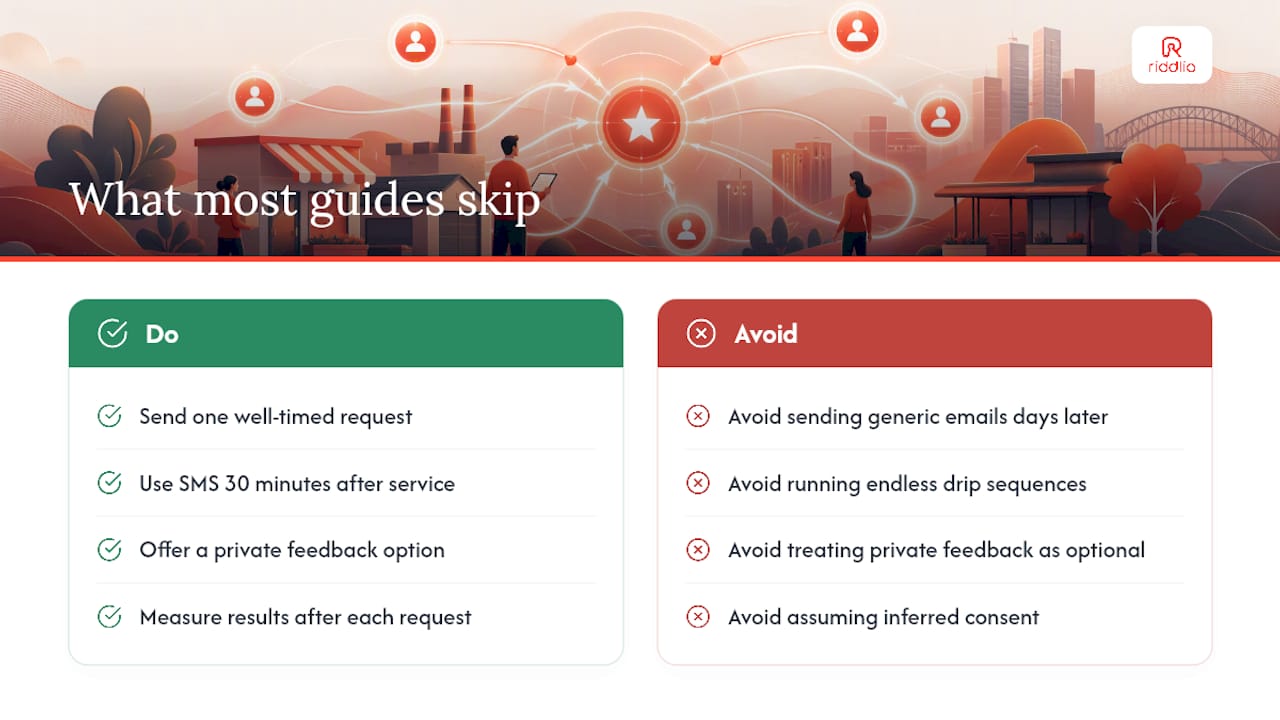
Most guides focus on the message. The real variable is the trigger timing, and for experience businesses, that window is brutally short. An escape room customer who walks out buzzing is a completely different person 48 hours later when a generic email arrives. The emotional peak is gone. The group has split up. The story has already been told to friends. That SMS sent 30 minutes after the game ends is not just better; it is catching a fundamentally different psychological moment.
The second thing most guides understate is the private feedback routing step. Businesses treat it as a nice-to-have. It is not. It is the mechanism that lets you fix problems before they become one-star reviews. A customer who gets a private feedback option and uses it is telling you something valuable. A customer who does not get that option and is unhappy has only one place to go.
The compliance piece is also consistently underplayed in generic guides written for US audiences. Australian businesses operate under the Spam Act 2003 and the Privacy Act 1988, and the obligations are specific. Inferred consent from a booking is not a blank cheque to message someone indefinitely. One well-timed, compliant review request is worth more than a drip sequence that erodes trust and attracts ACMA attention.
The businesses that get this right are not the ones with the most sophisticated tools. They are the ones that picked one trigger, sent one message at the right moment, and measured what happened.
Riddlio gives escape room venues a faster path to review automation
Escape room and activity venue operators spend enough time managing bookings, payments, and staff schedules without also building a review automation workflow from scratch. Riddlio’s booking completion triggers and automated SMS reminders are already built into the platform, which means the trigger you need, the booking-complete event, is available without a custom integration.

The practical difference: Riddlio connects your online booking calendar directly to your customer communications, so the moment a booking closes, the review request sequence can fire automatically. SMS templates, personalisation tokens, multi-location rules, and opt-out handling are part of the same system you already use to run the venue. No separate tool to manage, no CSV exports, no manual matching of customer records.
For venue operators ready to move from manual follow-ups to a consistent, compliant review automation workflow, the next step is straightforward: book a demo at riddlio.com and ask to see the post-booking SMS sequence in action.
Useful sources and official guidance
- Statista — Local business recommendation methods
- Twilio — Appointment reminders use case
- Yotpo support — Automatic review requests FAQ
- How to set up automated review requests — Podium
- Getpin — Review request automation
- ReviewStream.ai — Automated review requests
- ReputationStacker — Automated review requests
- AutoReview — Put review collection on autopilot