A booking audit log is the timestamped record of every change made to a reservation, who made it, and what the data looked like before and after. Admins use it to trace who cancelled a booking, resolve payment disputes, and produce evidence for compliance reviews. Done properly, it never stores raw secrets like card numbers, only the fact that a payment event occurred.
TL;DR:
- Audit logs should be restricted by role, with admins having full access, compliance staff limited to review, and front-desk staff seeing only their actions.
- Proper logs record key events like booking changes, payments, and resource updates, but never store raw sensitive data such as full card numbers or passwords.
- Linking related actions through request IDs enables reconstruction of entire booking or dispute chains, especially when investigating complex cases.
- Filters such as date range, event type, booking ID, and actor help quickly locate relevant records without hours of manual scrolling.
- Maintaining tamper-proof storage with cryptographic hashes and tiered retention ensures the integrity and availability of audit logs over time.
Table of Contents
- What booking audit logs record: standard events and fields
- Where to find audit logs and who should have access
- How to read and correlate audit log entries
- Filtering, searching, and exporting booking history
- Security, retention, and integrity best practices
- Troubleshooting common audit log issues and quick use cases
- How Riddlio approaches audit logs and operational reporting
- Keep a reliable booking history without the manual chasing
- Sources
- FAQ
What booking audit logs record: standard events and fields
An audit log is only as useful as its structure. A properly built booking system logs a defined set of events every time a reservation touches the system, not just when something goes wrong.
The events that matter most cover the full lifecycle of a booking:
- Booking created, modified, cancelled, or rescheduled
- Attendee or headcount changes
- Payment status updates (charged, refunded, disputed)
- Staff or resource assignment changes
- Exports and data downloads pulled from the system
Each event entry should carry a consistent set of fields so admins can actually piece together what happened. Vendor documentation across the booking software space, including OctopusPro’s change log, tends to converge on the same core structure: a timestamp, an actor ID and type (was it a staff member, a customer, or an automated job?), a request ID or correlation ID linking related actions, the action itself, the object ID (which booking), and the before/after values for whatever changed. Good logs also capture the source, such as an IP address or device.
None of that should include sensitive personal data in raw form. SonarSource’s audit logging guidance is blunt about this: never log passwords, and never log full payment card numbers. Mask or hash anything sensitive, and apply data minimisation as a default, not an afterthought. A log that records “payment method updated” is useful. A log that stores someone’s full card number is a liability waiting to surface in a breach report.
Where to find audit logs and who should have access
Most booking platforms split audit history into two views, and each serves a different job. The admin centre gives you the full organisation-wide feed. The per-booking timeline gives you the story of one reservation, start to finish.
- Check the per-booking timeline first for a single dispute. Open the booking record directly and look for a “history” or “activity” tab. This is usually the fastest way to see who touched that specific reservation.
- Use the admin centre for broader investigations. If you’re checking for patterns across many bookings, such as a staff member cancelling an unusual number of reservations, the central audit area lets you filter across the whole account rather than one record at a time.
- Confirm your time zone settings before drawing conclusions. Logs commonly display in UTC or the server’s local time, not the venue’s local time, and that mismatch causes more false “who did this at 3am” panics than anything else.
- Allow for UI latency on recent events. Some platforms batch log writes, so an action from the last few minutes may not appear instantly.
Access should never be all-or-nothing. Organisation admins typically get full read and export rights. A dedicated audit or read-only role lets finance or compliance staff review history without being able to alter bookings. Restricted front-desk operators usually see only their own actions, which limits blast radius if credentials are compromised. Platforms like Cal structure their audit access this way, separating who can view logs from who can act on bookings.
How to read and correlate audit log entries
Reading a single log line is easy. Reconstructing what actually happened across five related entries takes a bit more method.
Start with the before/after diff. A well-formed entry shows the field that changed, its previous value, and its new value side by side, rather than a vague “booking updated” note. If a reservation moved from 6pm to 8pm, the entry should say exactly that, not just flag that “details changed.”
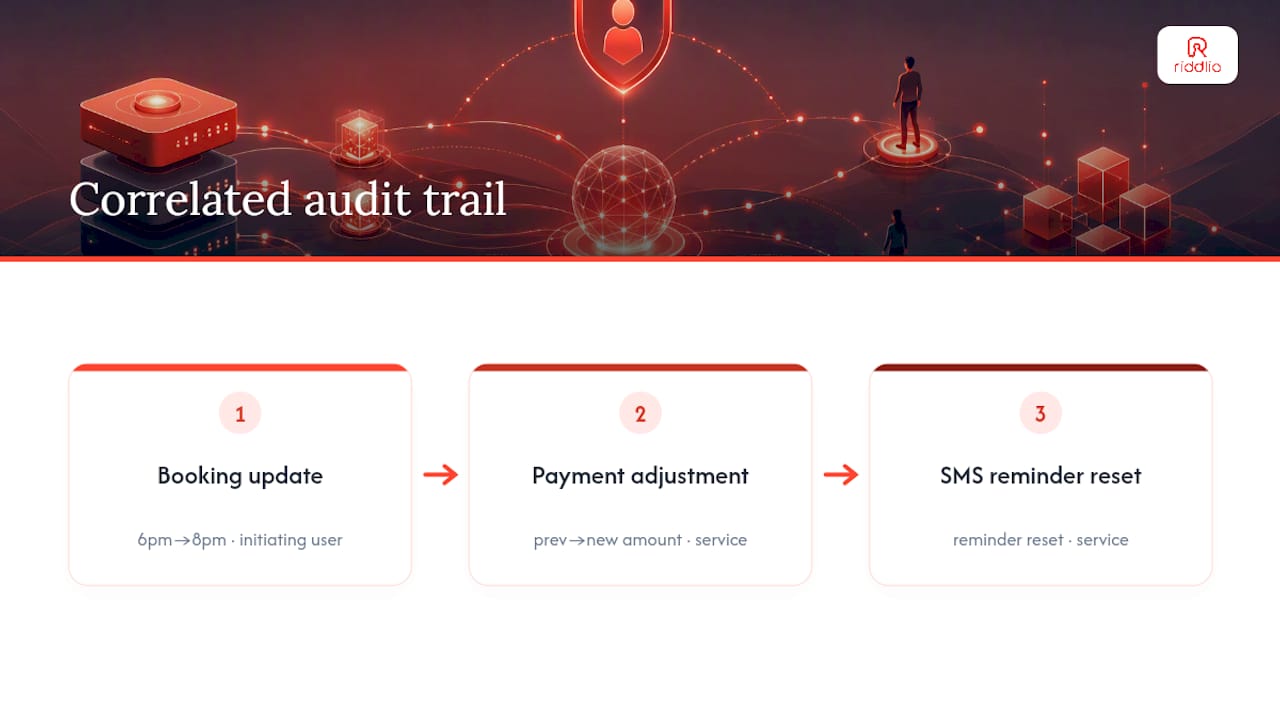
Next, use the request ID (sometimes called a correlation ID) to link entries that belong to the same underlying action. A single customer reschedule might trigger a booking update, a payment adjustment, and an SMS reminder reset, all under one request ID. Filtering by that ID pulls the whole chain together instead of leaving you to guess which three separate log lines were actually one event.
Actor identity matters more than it looks. For automated tasks, best-practice guidance from Invoance recommends capturing both the initiating principal and the service or process identity, rather than logging a generic “system” as the actor. A refund triggered by a customer request and a refund triggered by a scheduled batch job should never look identical in the log.
Pro Tip: When investigating a dispute, pull every entry tied to the same request ID before you form a theory about what happened. Isolated log lines are the single biggest cause of admins reaching the wrong conclusion.
Filtering, searching, and exporting booking history
Finding one incident in months of booking activity comes down to filtering well, not scrolling for an hour. The filters that actually earn their place in a booking audit trail are:
- Date range, to bracket the window around the disputed event
- Event type, to isolate cancellations, reschedules, or payment changes
- Booking ID, when you already know which reservation is in question
- Actor ID, when you’re reviewing one staff member’s or one customer’s activity
- IP address or action type, useful for spotting unusual access patterns
Once you’ve isolated the right records, export them. Most platforms offer CSV for a spreadsheet-friendly view or JSON for anything that needs to be fed into another system. A useful export includes the same core columns as the live log: timestamp, actor, action, object ID, and before/after values, not a stripped-down summary.
One detail admins routinely miss: the export itself needs to be logged. As BookingPam’s audit log documentation points out, if a staff member exports customer booking data for a subject access request, that export action becomes part of the record too. Without it, you have no evidence of who pulled what data and when, which defeats the purpose of keeping an audit trail for compliance in the first place.
Security, retention, and integrity best practices
A booking audit trail is only trustworthy if it can’t be quietly edited after the fact. That’s the whole point of keeping one.
Start with data minimisation. Never log raw sensitive fields such as full card numbers or passwords, mask or hash anything sensitive, and follow the same data minimisation principles SonarSource recommends for any system handling personal information.
Tamper evidence comes next. Invoance’s guidance on audit log integrity recommends cryptographic hash chaining across sequential records, paired with write-once, immutable storage, so a deleted or altered entry breaks the chain and gets flagged rather than vanishing quietly. Some practitioners run scheduled integrity validation checks and treat a failed check as a top-priority incident, not a background task.
Retention should be tiered rather than flat:
- Hot storage for recent logs you query often, kept fast and searchable
- Warm storage for logs a few months to a year old, still accessible but cheaper to hold
- Cold storage for anything older, archived for compliance windows like PCI or HIPAA where those frameworks apply
Automate the lifecycle rules that move data between tiers rather than relying on someone remembering to archive manually.
Separation of duties matters as much as the technical controls. The person who can approve refunds shouldn’t be the same person auditing refund logs unsupervised. A meta-audit log that records who accessed the audit system itself closes an obvious gap: without one, a staff member with log access could review or export sensitive booking data with nobody checking on them.
Alerting rounds out the picture. Splunk’s research on audit logs makes the case for adaptive, seasonal-aware anomaly detection over fixed thresholds, which matters enormously for entertainment venues. A spike in cancellations during a school holiday promotion isn’t suspicious, it’s just Tuesday. A fixed threshold flags it anyway and trains your team to ignore every alert that follows.
Troubleshooting common audit log issues and quick use cases
Most booking disputes follow the same shape: a customer disputes a charge, a manager wants to know who cancelled a booking, or a reschedule needs to be traced back to its source. The fix is almost always the same sequence.
- Filter by booking ID to isolate every entry tied to the reservation in question.
- Find the request ID on the relevant entry to pull in any linked actions, such as a payment adjustment triggered by the same reschedule.
- Review the before/after values to see exactly what changed and when, not just that “something” changed.
- Export the evidence if the finding needs to go to a payment processor, a compliance reviewer, or a customer dispute case.
Common snags include delayed writes (an action that hasn’t appeared yet), records that have rolled into cold storage and need a separate retrieval request, time zone mismatches that make an action look earlier or later than it was, and incomplete actor attribution on automated jobs that just say “system” instead of naming the process.
How Riddlio approaches audit logs and operational reporting
Escape room venues live and die by slot utilisation, and that makes clean booking records a genuine operational asset, not just a compliance checkbox. Riddlio was built specifically for this space, combining booking management, payment processing, and operational analytics into one system rather than stitching together separate tools that each keep their own partial history.
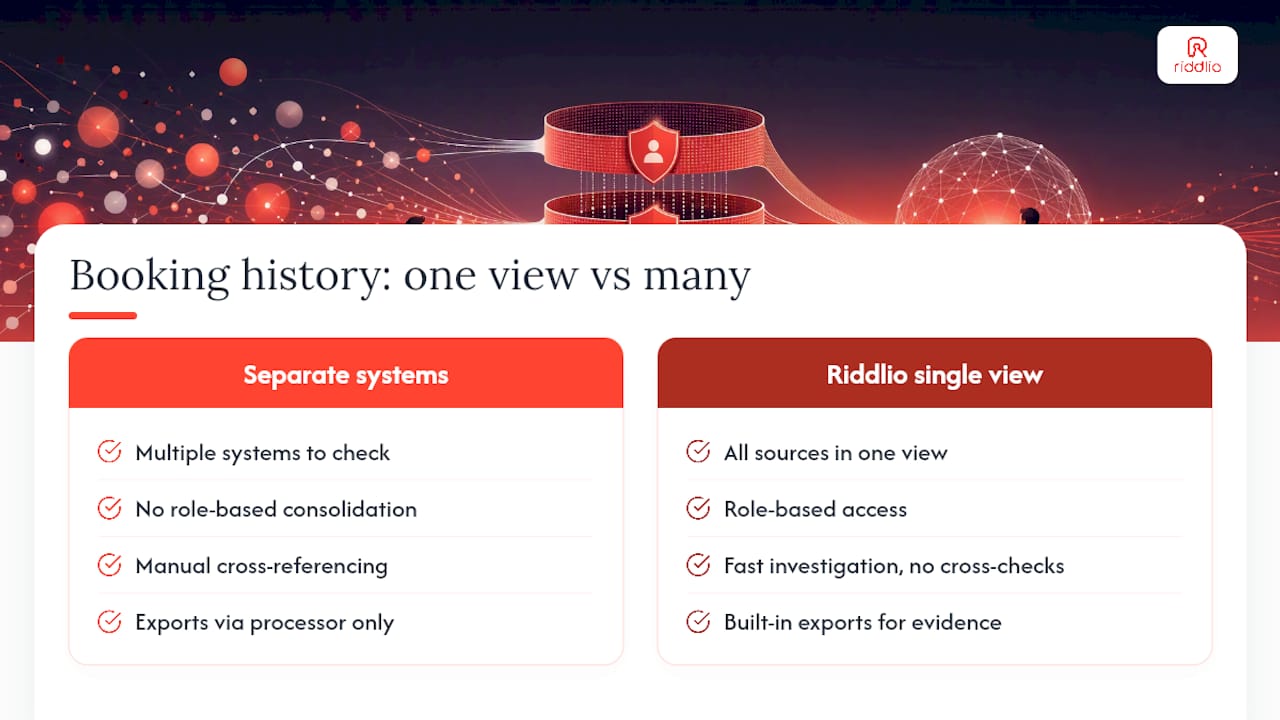
The value of an all-in-one view shows up most clearly during a dispute or a busy reconciliation week. When bookings, payments, and communications all sit inside the same platform, a manager checking why a slot was rebooked or a refund was issued isn’t cross-referencing three different systems with three different timestamps. Real-time analytics and a single operational record make that kind of investigation faster, and faster investigations mean fewer no-shows going unresolved and less time lost chasing down what actually happened on a Saturday night rush.
— Iosif Beraru
Keep a reliable booking history without the manual chasing
There are other ways to piece together booking history: spreadsheets, email trails, or whatever your payment processor happens to keep on its own dashboard. All of them mean stitching together records from separate systems every time a dispute or a compliance question comes up.
Riddlio keeps booking history, payment events, and customer communications inside one operational view, so a manager investigating a cancelled slot or a disputed refund isn’t cross-referencing three logins to find the answer. Role-based access means front-desk staff see their own activity while owners and managers get the full picture, and exports are built in for whenever a payment processor or a customer needs evidence. The online booking calendar shows how reservations and their history display in practice, and the escape room booking system overview covers how payments, analytics, and communications sit alongside it.
If you’re currently piecing booking history together from three different logins, book a demo of Riddlio and see what one operational record actually looks like.
Sources
- Audit logging (SonarSource library)
- Audit logs and their role in security and investigations (Splunk blog)
- Audit logs reasons and best practices (Invoance)
- Audit logging architecture: designing tamper-resistant, compliance-ready audit trails (SystemsHardening)
FAQ
What is in an audit log?
A booking audit log entry typically includes a timestamp, an actor ID, the action taken, the object (booking) ID, a request or correlation ID, and the before and after values of whatever changed.
Can you provide an example of an audit log entry?
A typical entry might read: a timestamp, an actor ID, an action such as “booking rescheduled”, a booking ID, before and after values showing a time change, and a request ID linking related actions.
How do I export a booking audit log?
Filter by the date range, event type, or booking ID you need, then export to CSV or JSON, and confirm the export itself gets recorded as its own audit log entry.
Who should have access to booking audit logs?
Organisation admins generally get full read and export rights, dedicated audit or read-only roles let compliance staff review history without editing bookings, and front-desk operators are usually limited to seeing their own actions.
How long should booking audit logs be retained?
Retention depends on your compliance obligations, but a common approach uses tiered storage, hot for recent logs, warm for the past several months, and cold archival storage for anything older that still needs to be kept.