Subscribing to your booking platform’s iCal feed is the fastest way to get reservations showing up in Apple Calendar. Copy the .ics feed URL from your booking system’s export or integrations settings, then add it as a subscription in Apple Calendar on Mac or through Settings on iPhone and iPad. You get a live, read-only view of every booking, but expect the feed to refresh on Apple’s schedule rather than the instant you take a new booking.
TL;DR:
- Subscribing to your booking platform’s iCal feed provides a live, read-only view that updates on Apple’s schedule, which can have delays of several hours.
- Use specific URLs from the platform’s export or integration settings, ensuring the link starts with “webcal://” or “https://,” for reliable subscription.
- Test feed URLs on one device first and set auto-refresh to the shortest available interval for critical reservation updates.
- Mobile staff should add the subscribed calendar via device settings, verify visibility, and enable notifications to avoid missed bookings.
- Apple Calendar feeds are one-way; manual edits inside Apple Calendar do not sync back to the booking system, making the feed a reliable reference but not a control point.
Table of Contents
- What is Apple calendar sync for booking platforms?
- How do I find my booking platform’s iCal feed?
- How do I subscribe on iPhone and iPad?
- Read-only feeds, imports, and what shows up in each booking
- How often does Apple Calendar refresh subscribed feeds?
- Common problems and how to fix them
- How Riddlio handles Apple calendar sync for escape rooms
- An escape room booking specialist’s take on relying on iCal
- Sources
- FAQ
What is Apple calendar sync for booking platforms?
Apple calendar sync, in the venue-operator sense, means connecting your booking system’s calendar data to Apple Calendar so staff can see reservations without logging into a separate dashboard. It is built on a decades-old web standard called iCal, the same format behind .ics files and webcal links. Most escape room booking platforms, Riddlio included, generate a unique iCal feed URL per venue, and that URL is the entire mechanism. There’s no app to install, no login screen, just a link that Apple Calendar checks periodically and updates itself.
This is different to syncing your own personal Apple ID across devices, which is the topic most search results assume when you type “Apple calendar sync.” Here, we’re talking about pulling business data, specifically your reservations, into a calendar app your staff already use.
How do I find my booking platform’s iCal feed?
Every booking platform buries this setting slightly differently, but the labels are predictable. Look for Export, iCal, Calendar Sync, Integrations, or Advanced Settings, usually tucked inside your venue or business profile. In some booking platforms, it typically sits under Setup → Integrations. Some platforms expose one master feed covering every room, others let you generate a separate URL per room or activity, which is worth doing if you run more than two rooms and want staff calendars that aren’t cluttered with bookings they don’t need to see, a pattern documented by TripWorks’ calendar sync guide.
Before you paste that URL anywhere, check its prefix. You’ll see either webcal:// or https:// at the start. Both point to the same feed, but Apple Calendar sometimes handles one better than the other depending on the device and network, something worth remembering if the subscription fails silently later.
Subscribing on a Mac
- Copy the full feed URL from your booking platform, including the
webcal://orhttps://prefix. - Open Calendar on your Mac.
- Go to File → New Calendar Subscription.
- Paste the URL and click Subscribe.
- Choose a name, colour, and whether it lives in iCloud (so it syncs to your other Apple devices) or On My Mac (local only).
- Set the Auto-refresh interval, then click OK.
Name the calendar something staff will recognise at a glance, like “Bookings — Riverside Escape Rooms,” not the generic name the platform assigns by default. If you run multiple rooms with separate feeds, repeat this process for each one and colour-code them so a glance at the week view tells you which room is booked solid and which has gaps.
Pro Tip: Set auto-refresh to the shortest interval Apple Calendar offers for subscriptions you check constantly, like your busiest weekend room, and a longer one for quieter feeds. It won’t make updates instant, but it narrows the gap.
How do I subscribe on iPhone and iPad?
Staff who run the floor rarely sit at a Mac, so the mobile setup matters just as much, sometimes more — using the Best Event Planning Apps for Pedal-Powered Group Tours can also enhance overall event coordination for mobile teams.
- Open Settings on the iPhone or iPad.
- Scroll to Calendar → Accounts.
- Tap Add Account → Other.
- Select Add Subscribed Calendar.
- Paste the feed URL into the Server field.
- Tap Next, review the settings, then tap Save.
Once saved, the subscribed calendar appears alongside personal calendars in the Apple Calendar app, and staff can toggle its visibility on or off from the calendar list without deleting the subscription. It’s worth walking new hires through this once during onboarding rather than assuming they’ll figure it out mid-shift.
Two things trip people up on mobile. First, make sure calendar notifications are switched on in the device’s own Calendar settings, otherwise a new booking can sit unnoticed until someone opens the app. Second, confirm the subscribed calendar is actually ticked as visible. It’s an easy toggle to miss, and an invisible calendar looks identical to an empty one.
Read-only feeds, imports, and what shows up in each booking
Understanding the difference between importing and subscribing will save you a support ticket. Importing an .ics file drops a static snapshot of bookings into Apple Calendar at that exact moment, and it never changes again, even if the source calendar updates. Subscribing to the iCal feed creates a persistent connection that Apple Calendar checks and refreshes on its own, which is exactly what Microsoft’s own explainer on subscribing versus importing confirms is the correct approach for anything operational. For venue scheduling, subscribe every time. Importing is fine for a one-off event, not for a live roster of bookings.
The other limit to know: these feeds are almost always one-way. If a staff member edits or deletes an event inside Apple Calendar, that change stays local and never writes back to your booking system. Treat the subscribed calendar as a mirror, not a control panel.
What actually shows up per booking depends on how your platform structures the feed, but typically includes:
- Event title (usually the room name or booking reference by default)
- Start and end time
- Location or resource assigned
- A booking ID or short internal note
The event title is the one field worth configuring properly, because it’s the only thing staff see in a glanced-at phone screen. A naming convention like “ROOM A — 19:00 — Team Smith” beats a generic “Booking #4471” every time you’re scanning a packed Saturday.
Pro Tip: If your platform allows custom title templates for the calendar feed, set one up once during onboarding. It costs five minutes and saves your front-of-house team from opening every event just to see which room it’s for.
How often does Apple Calendar refresh subscribed feeds?
Apple Calendar checks subscription URLs on its own polling schedule, not the moment a customer books. Refresh delays typically run from a few minutes to several hours, and in some cases can stretch close to 24 hours before an update appears. That’s a wide window, and it means a subscribed calendar should never be your only source of truth for a room filling up an hour from now.
A few things reduce the surprises:
- Keep your booking platform’s own live dashboard open at the front desk for anything last-minute.
- Pair the calendar feed with automated SMS reminders to staff and customers so confirmations don’t rely on someone spotting a calendar update in time.
- Treat manual edits inside the booking system, not Apple Calendar, as the only edits that count.
- If a booking needs to be seen within seconds, not hours, look at an API-based integration or the platform’s native app rather than leaning on iCal alone.
Apple Calendar is genuinely useful here. It’s just not built for split-second accuracy, and no calendar subscription protocol, from any vendor, promises otherwise.
Common problems and how to fix them
Most sync issues trace back to one of four causes, and they’re usually quick to diagnose.
- Subscription won’t appear at all. Double-check the URL was copied in full, then try swapping
webcal://forhttps://at the start of the address, a fix that resolves a surprising number of failed subscriptions according to Hospitable’s device sync guide. Confirm the feed isn’t sitting behind a login page Apple Calendar can’t authenticate through. - Events aren’t updating. Give it time first, since polling delays are normal. If nothing appears after several hours, regenerate the feed URL from your booking platform and re-subscribe.
- Times look wrong. Check your booking platform’s timezone setting against the device’s timezone. Bookings should be created in venue local time, not wherever the platform’s server happens to sit.
- Privacy concerns with a public link. A secret iCal address should never be pasted into a public document or shared channel. If one leaks, regenerate it immediately and store the new one somewhere access-controlled, a precaution OneCal’s guide to .ics URLs flags as easy to overlook.
How Riddlio handles Apple calendar sync for escape rooms
Riddlio publishes an iCal subscription URL for every venue, so staff subscribe once in Apple Calendar and see a live, read-only view of reservations without anyone re-entering bookings by hand. It also supports Google Calendar and Outlook sync from the same feed structure, which matters the moment your team isn’t all carrying iPhones.

That flexibility is the real advantage over stitching together spreadsheets or manually forwarding booking confirmations. Rosters stay accurate, staff aren’t juggling two versions of the schedule, and the automated reminders built into Riddlio’s SMS reminder feature catch the no-shows a calendar app alone never will. Combine that with real-time analytics on slot utilisation, and calendar sync stops being a workaround and starts being part of how the venue actually runs.
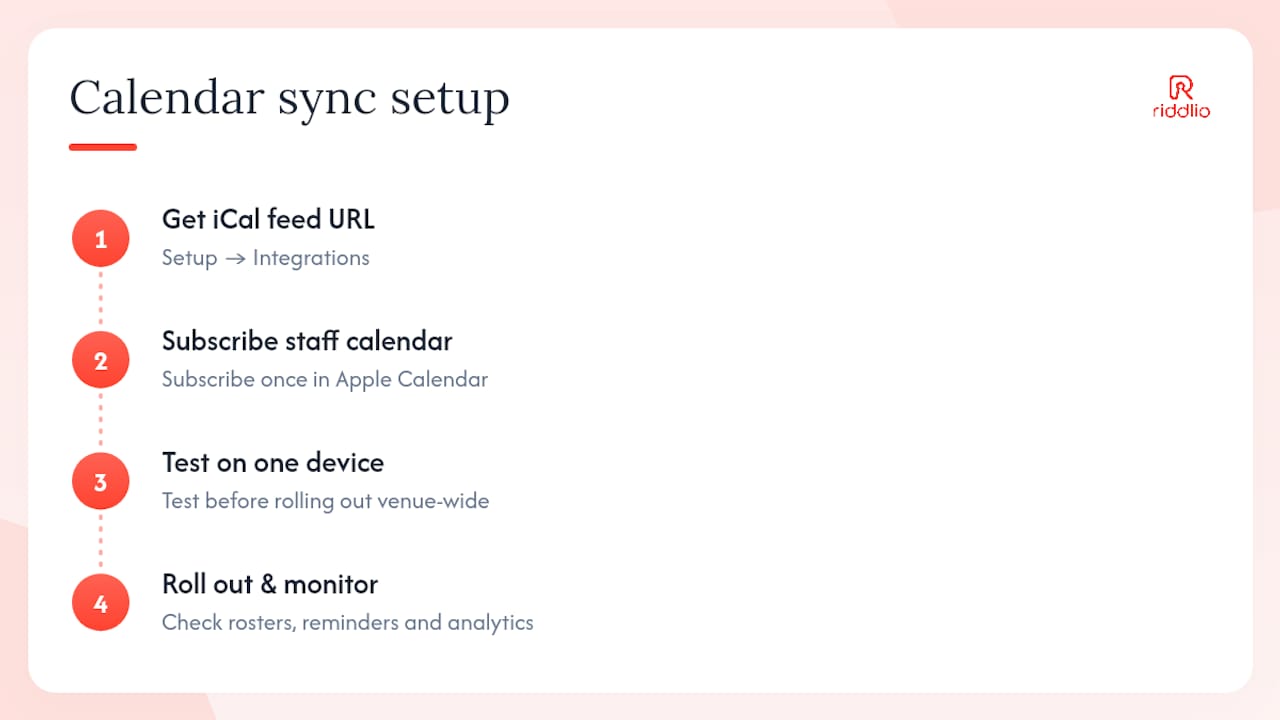
Find your feed URL under Setup → Integrations, test it on one staff device before rolling it out venue-wide, and check the Riddlio online booking calendar page for the full setup walkthrough if you’re still deciding whether Riddlio fits your rooms.
An escape room booking specialist’s take on relying on iCal
iCal sync is universal and about as low-friction as calendar tools get, but treating it as your only source of truth is a mistake I see venues make constantly. Pair it with a live admin dashboard for anything happening in the next hour, and reserve manual calendar edits for genuine emergencies only. Test visibility and timezone settings before a busy weekend, not during one, and give staff a one-line cheat sheet for reading event titles. A subscribed calendar earns its keep when it’s backup, not command centre.
— Iosif Beraru
Sources
- How can I add the iCal feed to the calendar on my device? — Hospitable
- Import or subscribe to a calendar in Outlook.com or Outlook on the web — Microsoft Support
- How to refresh your iCal feed — Hospitable
- Sync your bookings to Google Calendar, Apple Calendar & Outlook — TripWorks
- How to get an .ics URL for your calendar — OneCal
FAQ
Does subscribing to an iCal feed cost anything in Apple Calendar?
No. Apple Calendar’s subscription feature is built into macOS and iOS at no extra charge, though your booking platform may gate feed access behind a specific plan tier.
Can I edit a booking directly from Apple Calendar?
You can edit the event locally, but that change won’t sync back to your booking system, since subscribed iCal feeds are one-way and read-only for operational purposes.
Why don’t new bookings show up immediately?
Apple Calendar polls subscription URLs on its own schedule rather than in real time, and delays of several hours are normal, sometimes stretching close to 24 hours.
What’s the difference between importing and subscribing?
Importing creates a one-time static copy of events that never updates, while subscribing keeps a live connection that refreshes automatically, which is why subscribing is the recommended method for ongoing venue schedules.
Does Riddlio support calendar sync beyond Apple Calendar?
Yes. Riddlio publishes iCal feeds compatible with Apple Calendar and also supports direct Google Calendar and Outlook sync, useful for teams running a mix of devices.